Every time you type a domain name into a browser, the Domain Name System (DNS) helps translate that human-readable name into the IP address computers need to communicate. At the center of traditional DNS communication is one of the most important network ports on the Internet: port 53.
But DNS port 53 can be confusing because DNS does not rely on a single transport protocol. It can use both UDP port 53 and TCP port 53, with each serving an important purpose. Understanding when and why DNS uses them is useful for network administrators, developers, cybersecurity professionals and anyone learning how Internet infrastructure works.
This guide explains what DNS port 53 is, why DNS uses both TCP and UDP, how encrypted DNS changes the picture, and what administrators should consider when configuring DNS traffic.
- Port 53 is the standard port associated with traditional DNS traffic.
- UDP port 53 is commonly used for ordinary DNS queries because it has low transport overhead.
- TCP port 53 is required in situations where reliable stream transport is needed, including DNS zone transfers and some larger exchanges.
- DNS security depends on much more than simply opening or closing port 53.
- Encrypted DNS protocols such as DoT, DoH and DoQ can use other ports and transport mechanisms.
Table of Contents
What is DNS port 53?
The Domain Name System is often described as the Internet’s phone book. Its job is to help map domain names such as example.com to information such as IP addresses.
Without DNS, users would frequently need to remember numerical IP addresses instead of convenient domain names. DNS therefore sits behind a huge number of everyday Internet interactions, from opening websites to connecting to online services.
Network ports allow different services to communicate through the same IP address. You can think of an IP address as a building address and a port number as a specific door leading to a particular service.
Traditional DNS is assigned port 53 for both UDP and TCP. This assignment is standardized and widely recognized across operating systems, routers, firewalls and DNS software.
The original DNS specifications are documented in RFC 1035, an authoritative reference for the implementation and specification of the Domain Name System.
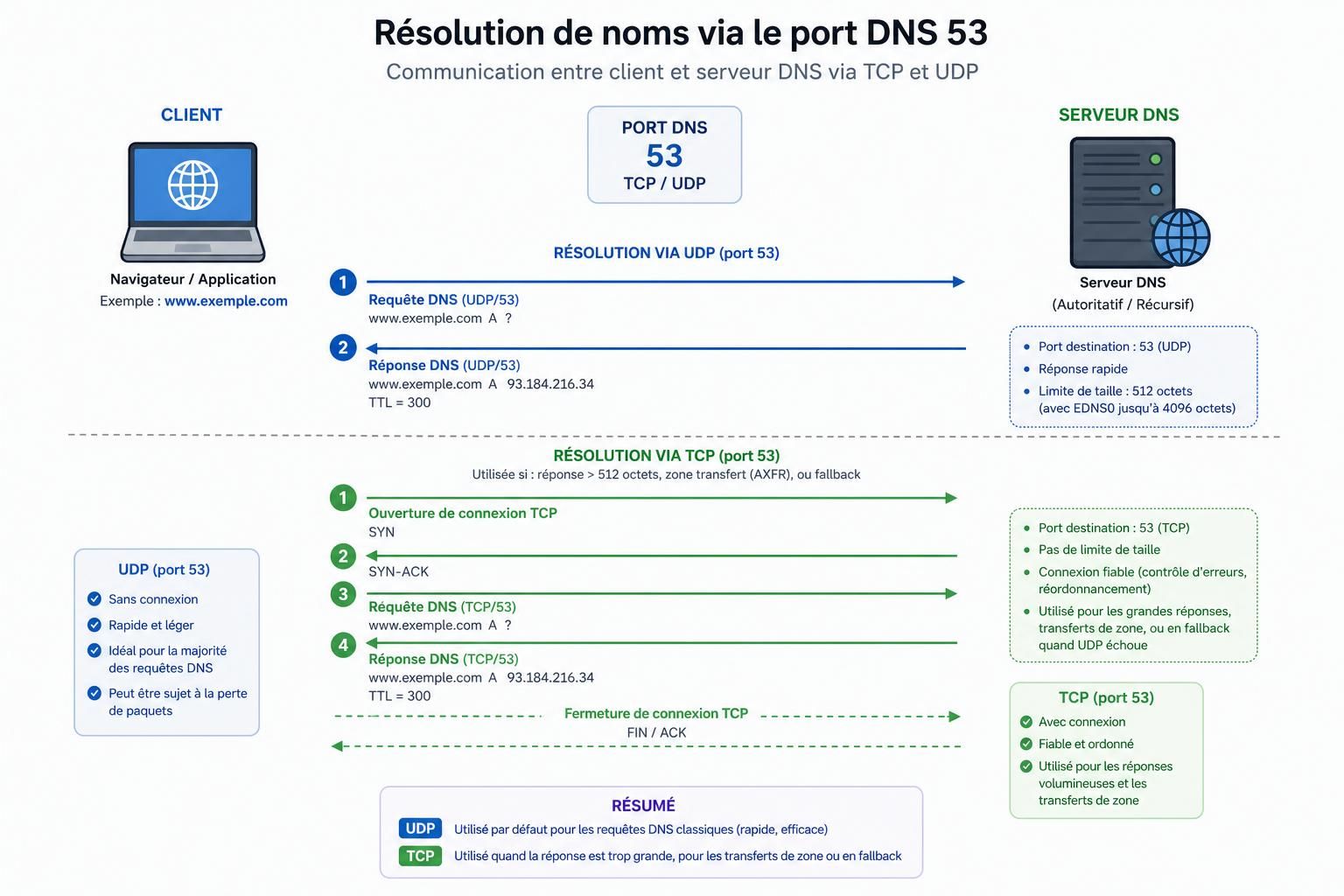
Why does DNS use both UDP and TCP port 53?
One of the most common questions about DNS is whether it uses TCP or UDP. The correct answer is both.
For many conventional DNS queries, UDP is a natural fit because it is connectionless and has relatively little transport overhead. A resolver can send a request and receive a response without first establishing a TCP connection.
Why DNS commonly uses UDP port 53
Many DNS lookups involve relatively compact exchanges: a client asks a DNS resolver for information about a domain, and the resolver returns the appropriate records.
UDP works well for this pattern because it avoids the connection-establishment process associated with traditional TCP communication.
Historically, DNS over UDP was associated with a 512-byte message size limit. Modern DNS is more nuanced because EDNS (Extension Mechanisms for DNS) allows DNS implementations to advertise support for larger UDP payloads.
This distinction matters because modern DNS responses can be significantly larger than early DNS messages, particularly when technologies such as DNSSEC add additional records and cryptographic information.
When does DNS use TCP port 53?
TCP remains an essential part of DNS and should not be treated as an optional legacy feature.
For example, when a DNS response sent over UDP is truncated, the client may retry the query using TCP port 53. TCP provides a reliable byte stream and can carry DNS messages that are unsuitable for the original UDP exchange.
TCP is also important for DNS zone transfers. Operations such as AXFR and IXFR allow DNS servers to transfer zone information and require reliable communication between the relevant servers.
| DNS situation | Typical transport | Why |
|---|---|---|
| Standard DNS query | UDP port 53 | Low transport overhead for ordinary queries |
| Truncated UDP response | TCP port 53 | Allows the exchange to continue reliably over TCP |
| DNS zone transfer | TCP port 53 | Reliable transfer of zone data |
Is port 53 TCP or UDP?
Port 53 is used with both TCP and UDP. Saying that DNS is simply a UDP protocol is therefore incomplete.
UDP is extremely common for conventional DNS queries, while TCP is part of normal DNS operation and becomes important in specific situations.
This distinction is particularly important when configuring networks. Blocking all TCP traffic on port 53 because “DNS uses UDP” can cause DNS failures that are difficult to diagnose.
Understanding protocols, ports and server behavior is also a fundamental skill for infrastructure, cybersecurity and system administration roles. If you are exploring this field professionally, our Tech Careers section covers more topics related to careers and skills in technology.
DNS port 53 security: what are the risks?
Port 53 is essential to traditional DNS, but exposing a DNS service incorrectly can create security and operational risks.
One well-known example is DNS amplification. Improperly configured open recursive resolvers can be abused as part of distributed denial-of-service attacks, particularly when attackers spoof the source address of UDP requests.
That does not mean administrators should simply block port 53. DNS servers must remain reachable by the systems they are intended to serve.
The correct firewall policy depends on the role of the machine:
- DNS clients need to communicate with their configured resolvers.
- Recursive resolvers should restrict recursion to authorized users or networks rather than operate as unrestricted open resolvers.
- Authoritative DNS servers need to answer legitimate queries for the zones they serve.
- Zone transfers should be restricted to authorized secondary servers rather than exposed indiscriminately.
Should TCP and UDP port 53 both be allowed?
If you operate DNS infrastructure, do not assume that allowing UDP alone is sufficient. Legitimate DNS communication can require both UDP and TCP on port 53.
However, that does not mean every device should accept unrestricted inbound DNS traffic from the entire Internet. Firewall rules should reflect whether the system is acting as a client, recursive resolver, authoritative server or secondary DNS server.
For production infrastructure, use the documentation for your DNS implementation, operating system and network architecture rather than copying generic firewall rules without understanding their effect.
DNS over TLS, HTTPS and QUIC: what happens to port 53?
Traditional DNS traffic on port 53 is generally not encrypted. This has encouraged the development and adoption of encrypted DNS transports designed to improve confidentiality between clients and supported DNS resolvers.
The three technologies you are most likely to encounter are DNS over TLS (DoT), DNS over HTTPS (DoH) and DNS over QUIC (DoQ).
DNS over TLS (DoT)
DNS over TLS encrypts DNS communication using TLS. The standardized service commonly uses TCP port 853.
DNS over HTTPS (DoH)
DNS over HTTPS sends DNS queries through HTTPS, commonly using port 443. Because the communication is carried through HTTPS, it can share infrastructure and transport characteristics with ordinary encrypted web traffic.
DNS over QUIC (DoQ)
DNS over QUIC carries DNS messages over QUIC and uses UDP port 853 by default. This is an important distinction from DNS over TLS, which uses TCP.
| Port | Transport | DNS technology | Encrypted? |
|---|---|---|---|
| 53 | UDP / TCP | Traditional DNS | No transport encryption by default |
| 853 | TCP | DNS over TLS (DoT) | Yes |
| 443 | HTTPS transports | DNS over HTTPS (DoH) | Yes |
| 853 | UDP / QUIC | DNS over QUIC (DoQ) | Yes |
Does encrypted DNS replace port 53?
No. Encrypted DNS has become increasingly important, but traditional DNS on port 53 remains a fundamental part of Internet infrastructure.
Different environments can use different DNS transports depending on operating systems, applications, resolver configurations and network policies.
It is therefore better to think of DoT, DoH and DoQ as additional ways of transporting DNS rather than assuming that port 53 has become obsolete.
How to check whether port 53 is in use
If you administer a system, you may need to identify which process is listening on port 53 or verify whether DNS traffic is working correctly.
On Linux, tools such as ss and lsof can help identify processes listening on network ports.
For example:
sudo ss -tulnp | grep :53Another option is:
sudo lsof -i :53On Windows, netstat can be used to inspect network connections and listening ports:
netstat -ano | findstr :53These commands can help identify local services using port 53, but they do not by themselves prove that DNS is correctly configured or securely exposed.
How to test DNS connectivity
DNS troubleshooting tools can help verify whether name resolution works and which resolver is answering a request.
Common tools include nslookup and dig. Their availability depends on the operating system and installed packages.
When troubleshooting, administrators should distinguish between several different problems: whether the DNS service is listening, whether a firewall permits the required traffic, whether the resolver is reachable and whether the DNS records themselves are correct.
- Check which process is listening on TCP and UDP port 53.
- Verify that firewall rules match the actual role of the DNS server.
- Test name resolution using tools such as
nslookupordig. - Restrict DNS recursion to authorized networks when appropriate.
- Restrict zone transfers to authorized secondary DNS servers.
- Review current standards and your DNS software’s official documentation before changing production configurations.
DNS port 53 FAQ
What is port 53 used for?
Port 53 is the standard port associated with traditional DNS traffic. DNS uses it to exchange information involved in domain name resolution and other DNS operations.
Does DNS use TCP or UDP port 53?
Both. DNS uses UDP and TCP port 53. UDP is common for ordinary queries, while TCP is essential for operations such as zone transfers and certain exchanges that cannot be completed appropriately over UDP.
Why does DNS use both TCP and UDP?
UDP has relatively low transport overhead and works well for many conventional DNS requests. TCP provides reliable stream transport and is important for larger or specialized DNS exchanges.
Should TCP and UDP port 53 both be allowed through a firewall?
DNS infrastructure may require both, but the correct firewall policy depends on the system’s role. A DNS client, recursive resolver and authoritative server do not have identical inbound and outbound requirements.
Which ports are used for encrypted DNS?
DNS over TLS commonly uses TCP port 853, DNS over HTTPS commonly uses port 443, and DNS over QUIC uses QUIC over UDP port 853 by default.
How can I check what is using port 53?
On Linux, commands such as ss and lsof can identify processes using port 53. On Windows, netstat can help inspect listening ports and connections.