Choosing the best password manager has become one of the simplest ways to improve your online security. Between email accounts, banking apps, social networks, streaming services and work platforms, most people now manage dozens — sometimes hundreds — of logins. Trying to remember them all often leads to the same dangerous habits: weak passwords, predictable variations and password reuse.
A good password manager solves that problem by storing your credentials inside an encrypted vault, generating strong and unique passwords, and securely syncing them across your devices. The best services now go even further, offering passkey support, multi-factor authentication, breach monitoring and secure sharing.
But trusting one application with all your credentials raises an obvious question: which password manager should you actually trust in 2026? Below, we compare some of the leading options, including Bitwarden, Dashlane, NordPass, Keeper and KeePass, and explain what really matters when choosing one.
In short:
- The best password managers protect sensitive data with strong encryption and carefully designed security architectures.
- Look beyond encryption alone: multi-factor authentication, passkey support, independent security audits and cross-device compatibility also matter.
- Bitwarden remains one of the strongest choices for users looking for an open-source password manager with a capable free tier.
- Dashlane focuses on a polished experience and additional security features, while Keeper is particularly attractive to security-conscious users and businesses.
- KeePass gives advanced users extensive control but requires more manual configuration than mainstream cloud-based alternatives.
- No password manager eliminates every risk. A strong master password, MFA and good security habits remain essential.
Table of Contents
Best password manager: what should you look for in 2026?
Finding the best password manager is not simply about choosing the service with the longest feature list. Security architecture, usability, transparency and compatibility all play an important role.
Encryption is the first thing to examine. Reputable password managers typically rely on well-established cryptographic standards such as AES-256 or XChaCha20 to protect vault data. NordPass, for example, uses XChaCha20, while services including Bitwarden, Dashlane and Keeper use AES-256-based encryption systems.
However, seeing “256-bit encryption” on a product page should not automatically earn your trust. How encryption keys are generated, where encryption and decryption take place, how authentication is handled and whether the architecture has been independently reviewed are equally important.
Another major consideration is a zero-knowledge architecture. In a properly implemented zero-knowledge system, the provider is designed so that it cannot simply read the contents of your password vault. Your sensitive vault data is encrypted before being stored or synchronized.
Strong authentication is equally important. Look for support for multi-factor authentication (MFA), security keys, biometrics and, increasingly, passkeys. These additional layers can make account takeover significantly harder, particularly if your master password is ever exposed.
Cross-platform support should also be high on your checklist. A password manager is most useful when it works smoothly across Windows, macOS, Android and iOS, as well as major browsers such as Chrome, Firefox, Edge and Safari. If accessing your vault becomes frustrating, you are more likely to fall back into insecure habits.
Finally, consider transparency and usability. A technically impressive password manager that is difficult to use may be a poor choice for the average person. Likewise, a beautiful interface should never compensate for weak security practices or a lack of transparency.
- Strong, modern encryption
- Zero-knowledge or comparable client-side security architecture
- Multi-factor authentication and passkey support
- Cross-platform apps and browser extensions
- Independent security audits and transparent documentation
- Reliable autofill and password generation
- An interface you will actually use every day
For additional research, independent comparisons from publications such as PCMag and Wired can provide another perspective. Because features and prices change regularly, always check the provider’s current documentation before subscribing.
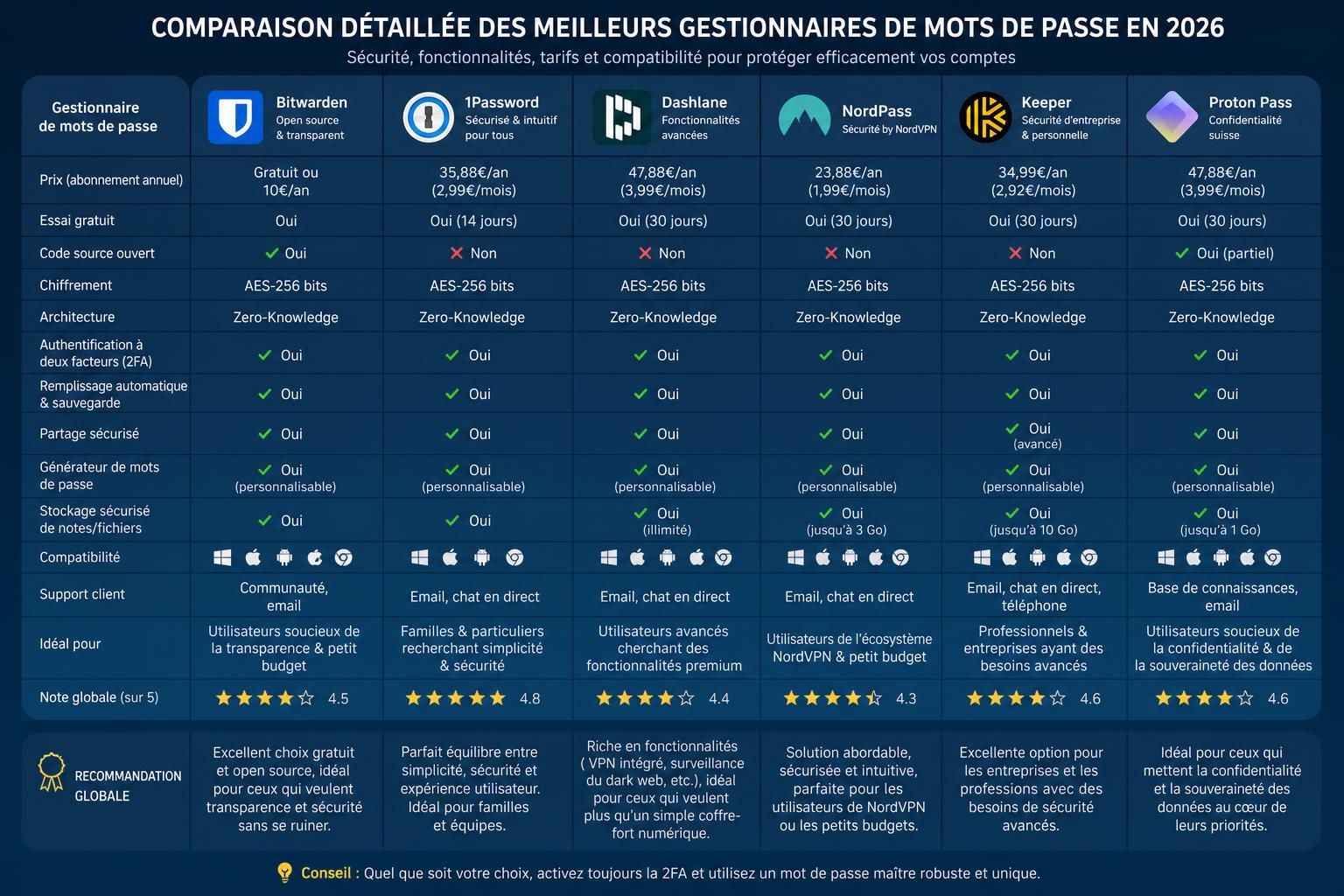
Best password managers compared: our top options for 2026
There is no single password manager that is perfect for everyone. Some users prioritize open-source software and affordability, while others want the smoothest possible experience or advanced business security features. Here is how five major options compare.
Bitwarden: best password manager for value and open-source transparency
Bitwarden is one of the easiest password managers to recommend to a broad range of users. Its combination of open-source software, strong encryption, cross-platform compatibility and a generous free offering makes it particularly compelling for individuals who want strong password security without immediately paying for a subscription.
Bitwarden lets users store passwords and other sensitive information, generate unique credentials and synchronize their vault across devices. It also supports modern authentication features, including passkeys, and offers paid plans for users who need additional functionality.
The interface is functional rather than luxurious, and some competitors may feel slightly more polished. But for users who prioritize security, transparency, flexibility and value, Bitwarden is one of the strongest all-round password managers in 2026.
Dashlane: best for a polished security experience
Dashlane combines password management with a particularly polished user experience and a broader collection of security tools. Its vault uses a zero-knowledge architecture, with vault data encrypted and decrypted locally on authorized devices.
Dashlane also provides password-health tools, dark web monitoring and additional security features designed to help users identify weak, reused or compromised credentials. Its support for passkeys and passwordless technologies makes it an interesting option for people preparing for a future in which traditional passwords play a smaller role.
One important change in 2026 is that Dashlane no longer offers its former Free plan. For that reason, it makes the most sense for users who are comfortable paying for a premium password-management experience rather than those specifically looking for a permanently free solution.
NordPass: best for simplicity and an intuitive interface
NordPass is designed around simplicity. Its clean interface makes it particularly accessible to people who want to improve their password security without dealing with complicated settings.
Instead of AES-256, NordPass uses XChaCha20 to encrypt password vaults. XChaCha20 is a modern and respected encryption algorithm, and its use should be viewed as a different technical approach rather than evidence that NordPass is automatically more or less secure than AES-based competitors.
NordPass also supports password generation, autofill, cross-device synchronization, passkeys and tools designed to identify compromised credentials. It is a particularly attractive option for users who value ease of use and want something that works with minimal configuration.
Keeper: best for security-focused users and businesses
Keeper takes a security-first approach and offers a broad range of features for individuals, families and organizations. Its vault architecture uses client-side AES-256 encryption and a zero-knowledge model designed to prevent Keeper itself from accessing users’ decrypted vault data.
Beyond standard password storage, Keeper provides secure sharing and access-control features that become particularly useful in professional environments. Its business-oriented capabilities make it an appealing choice for organizations that need more granular control over credentials and sensitive information.
The trade-off is that users looking for the simplest or cheapest password manager may find other options more attractive. Keeper makes the most sense when security controls and advanced functionality matter more than having the most minimalist experience.
KeePass: best for advanced users who want local control
KeePass takes a fundamentally different approach. Rather than centering the experience around a commercial cloud service, KeePass lets you maintain an encrypted password database locally and gives you extensive control over how that database is stored and synchronized.
This approach can be extremely attractive to privacy-conscious and technically experienced users. You are not forced to rely on a password-manager company’s cloud infrastructure, and you can decide how your encrypted database is backed up or synchronized.
But greater control comes with greater responsibility. KeePass requires more manual setup, and synchronization across devices is less seamless than with mainstream cloud-based password managers. For most beginners, Bitwarden, Dashlane, NordPass or Keeper will be easier to deploy correctly.
| Password manager | Encryption | Best for | Key features | Free option |
|---|---|---|---|---|
| Bitwarden | AES-256 | Best overall value | Open source, passkeys, cross-device sync, secure sharing | Yes |
| Dashlane | AES-256-based vault encryption | Premium user experience | Password health, dark web monitoring, passkeys, additional security tools | No permanent Free plan |
| NordPass | XChaCha20 | Ease of use | Passkeys, autofill, password generation, breach-related tools | Yes |
| Keeper | AES-256 | Security-focused users and businesses | Secure sharing, access controls, encrypted vault, business features | Limited availability depending on plan/platform |
| KeePass | AES and ChaCha20 support | Advanced users and local control | Local database, open source, extensive customization | Yes |
Which is the best password manager overall?
If you want one recommendation that works well for most people, Bitwarden is arguably the best starting point in 2026. It combines strong security fundamentals, open-source transparency, broad device compatibility and a useful free tier without forcing beginners into a complicated setup.
That does not make it objectively superior in every category. Dashlane may be a better fit if you value a polished premium experience and additional security tools. NordPass is attractive if simplicity is your priority. Keeper makes sense for demanding users and organizations, while KeePass remains an excellent option for technically experienced people who want greater control over where their password database lives.
The important point is that the best password manager is the one that combines a trustworthy security model with an experience you will consistently use. A theoretically excellent tool provides little protection if its complexity pushes you back toward reused passwords.
Passkeys are changing what password managers do
Password managers are no longer limited to storing usernames and passwords. One of the biggest changes is the rise of passkeys, a phishing-resistant authentication technology designed to reduce our dependence on traditional passwords.
Instead of authenticating with a shared secret that you type into a website, passkeys rely on public-key cryptography. The private credential remains under the user’s control, while the service receives the corresponding public key. This design makes passkeys far more resistant to conventional phishing because there is no reusable password for an attacker to steal and enter on another website.
Modern password managers increasingly allow users to store and synchronize passkeys alongside traditional credentials. This is important because passwords are unlikely to disappear overnight. For the foreseeable future, most people will live in a hybrid environment containing passwords, passkeys, authentication codes and recovery credentials.
That makes password managers potentially even more useful: rather than becoming obsolete in a passwordless future, they can evolve into broader credential managers.
How to use a password manager securely
Installing the best password manager you can find is only the first step. Your security still depends on how you configure and use it.
Start with your master password. If your chosen manager uses one, it should be unique and never reused for another account. Length matters considerably, so a long passphrase made from multiple unrelated words can often provide a better combination of security and memorability than a short, complicated-looking password.
Next, enable multi-factor authentication whenever your password manager supports it. An authenticator app or hardware security key can provide an additional barrier if someone obtains your master password.
Then install the official application and browser extension on the devices you regularly use. This allows the password manager to generate and fill unique passwords automatically, removing one of the main reasons people reuse credentials: convenience.
Use the manager’s security-audit tools to identify weak, reused and compromised passwords. Prioritize your most important accounts first — especially your primary email account, financial services and accounts capable of resetting other passwords.
Finally, prepare for account recovery before you need it. Understand how your chosen password manager handles recovery, keep recovery information in a secure location and, where appropriate, maintain a protected backup. The exact procedure depends on the password manager you use.
- Use a long and unique master password or passphrase
- Enable multi-factor authentication
- Install only official apps and browser extensions
- Generate a unique password for every account
- Replace passwords known to be compromised
- Secure your recovery information
Are password managers really safe?
No security product can honestly promise zero risk. Password managers can contain extremely valuable information, which naturally makes them attractive targets for attackers. The relevant question is therefore not whether password managers are “unhackable,” but whether using a reputable one reduces your overall risk compared with realistic alternatives.
For most people, the answer is yes. Reusing the same password across multiple websites creates a particularly dangerous chain reaction: once one service is breached, attackers can try the exposed credentials on email, shopping, social media and financial accounts. A password manager makes it practical to use a different, randomly generated password for every service.
However, your vault deserves particularly strong protection. Use MFA, keep your devices updated, download extensions only from official sources and remain suspicious of messages asking you to reveal your master password or recovery information.
Common password manager mistakes to avoid
A password manager can dramatically improve your security, but poor configuration can undermine many of its benefits. Several mistakes are particularly worth avoiding.
First, never treat an unencrypted spreadsheet, text document or email draft as a substitute for a proper password manager. Storing dozens of credentials in an easily readable file creates an obvious single point of failure if that file or account is compromised.
Second, never reuse your master password elsewhere. Your password-manager credentials should be treated differently from ordinary website passwords because they protect access to your entire vault.
Third, be extremely cautious about phishing. Attackers may impersonate your password-manager provider and attempt to convince you to enter your master password, recovery key or authentication code into a fraudulent page. Always verify where you are entering sensitive credentials.
Finally, do not choose a password manager solely because it is cheap, popular or heavily advertised. Examine its security documentation, update history, supported authentication methods and approach to independent audits. Security claims deserve evidence.
- Do not store passwords in unsecured documents or spreadsheets
- Never reuse your master password
- Protect your vault with MFA whenever possible
- Watch for phishing attempts targeting your password manager
- Keep your password manager and devices updated
- Prefer providers with transparent security documentation and independent audits
Best password manager FAQ
What is the best password manager in 2026?
Bitwarden is one of the strongest overall choices for most users in 2026 thanks to its combination of security, open-source transparency, broad compatibility and a useful free tier. Dashlane, NordPass, Keeper and KeePass remain strong alternatives depending on your priorities.
What is the best free password manager?
Bitwarden is one of the best free password managers for most people. It provides the core features needed to create, store and use unique passwords without requiring a paid subscription. KeePass is another powerful free option, particularly for advanced users who prefer local control.
Are password managers safe?
Reputable password managers use strong encryption and carefully designed security architectures to protect vault data. No solution is completely risk-free, but using a trusted password manager with a strong master password and multi-factor authentication is generally much safer than reusing the same passwords across multiple accounts.
Can a password manager be hacked?
Any software company or user can potentially be targeted by attackers, so claims that a password manager is completely “unhackable” should be treated skeptically. What matters is whether the service is designed so that a breach does not automatically expose usable plaintext passwords. Strong encryption, zero-knowledge architecture and MFA can substantially reduce the risk.
Should I pay for a password manager?
Not necessarily. A good free password manager can be enough for many individual users. Paid subscriptions become more useful if you need advanced family sharing, business administration, additional monitoring features, premium support or other specialized tools.
Do passkeys replace password managers?
Not completely. Passkeys reduce the need for traditional passwords, but users still need a convenient way to manage credentials across devices and services. Many leading password managers now support both passwords and passkeys, positioning them to remain useful as authentication technology evolves.