Sending large files should be simple. But if you regularly share videos, photo libraries, design projects or large work documents, the limits of free file-transfer services can quickly become frustrating. That is why finding the right WeTransfer alternative can make a real difference — especially if you want to send large files for free without creating an account or immediately paying for a subscription.
The good news is that WeTransfer is far from your only option in 2026. Several file-sharing services now compete on transfer limits, download-link duration, privacy, speed and ease of use. Some are designed for occasional transfers, while others can handle extremely large files or provide additional collaboration and security features.
So which service should you choose? Below, we compare 7 WeTransfer alternatives worth considering in 2026 and explain what to check before trusting a platform with your files.
- Higher transfer limits can make some WeTransfer alternatives more practical for videos and other large files.
- No-account transfers are particularly useful when you simply want to upload a file and send someone a link.
- Security and privacy matter as much as transfer size, particularly for professional or confidential files.
- Link expiration varies significantly between services and can determine how convenient a platform is for recipients.
- There is no universal best option: the right service depends on file size, frequency, privacy requirements and whether you need cloud collaboration.
Table of Contents
What makes a good WeTransfer alternative in 2026?
Before choosing the first free file-transfer service you find, it is worth understanding what made WeTransfer popular in the first place: simplicity. Upload your files, create a transfer and give the recipient a convenient way to download them.
A good WeTransfer alternative should preserve that simplicity while improving on the areas that matter to you. For most people, five factors deserve particular attention: transfer size, link expiration, account requirements, security and price.
Maximum file size and transfer limits
The first question is obvious: how large are the files you need to send? A service suitable for sending a 500 MB presentation may become useless when you need to transfer 20 GB of raw video footage.
Do not look only at the advertised maximum file size. Some platforms also impose daily or monthly transfer limits, restrict the number of free transfers, throttle large uploads or reserve their highest limits for paid plans.
If you regularly work with video, photography, 3D assets or large archives, these restrictions can matter more than almost any other feature.
How long do download links remain available?
Temporary file-transfer services usually delete uploaded files after a predefined period. That is good for limiting unnecessary storage, but a very short expiration period can create problems when recipients do not download files immediately.
For professional transfers, a longer availability period can be particularly useful when working across time zones, waiting for client approval or sending files before a weekend.
Can you send files without creating an account?
One of the biggest advantages of dedicated transfer services over traditional cloud storage is convenience. If you only need to send a file once, creating another account, verifying an email address and configuring a storage space can feel unnecessary.
For occasional transfers, a service that lets you send large files without registration can therefore provide a much smoother experience.
Security and privacy
File size should never be the only deciding factor. If you are uploading contracts, client documents, internal company files or personal information, you also need to understand how the service protects data during transfer and storage.
Look for clearly documented encryption, secure HTTPS connections, access controls, optional password protection and transparent privacy policies. For businesses operating in Europe, GDPR-related considerations may also influence which provider is appropriate.
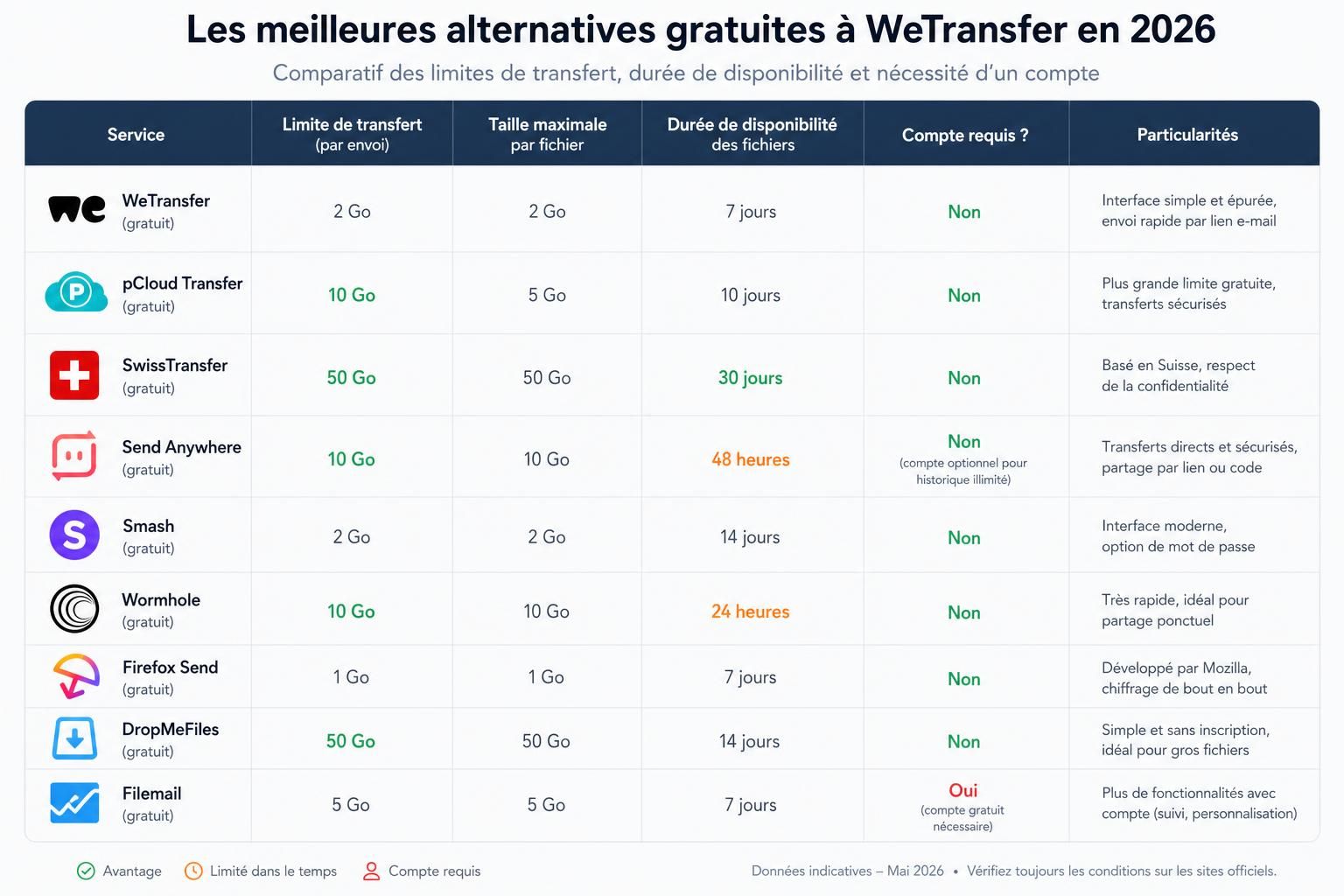
7 best WeTransfer alternatives for sending large files
There is no single service that wins in every category. Some prioritize extremely large transfers, others focus on simplicity, while cloud-storage platforms are better suited to long-term collaboration. Here are seven options worth comparing.
1. FreeSend.io: an option for very large free transfers
FreeSend.io positions itself as a simple file-transfer service for users who need significantly more capacity than many conventional free plans provide. Its main attraction is the ability to handle very large transfers without turning the process into a traditional cloud-storage workflow.
According to the service’s advertised offering, transfers can reach up to 100 GB, with download links remaining available for several days. That makes it potentially interesting for creators, video professionals and other users who routinely work with files measured in tens of gigabytes rather than megabytes.
The important distinction is that a high transfer limit does not automatically make a service the best choice for sensitive information. Before uploading confidential professional data, check the provider’s current privacy policy, security documentation, data-retention rules and applicable terms.
2. TransferNow: a strong European WeTransfer alternative
TransferNow is a French file-transfer service and one of the most obvious alternatives for European users looking for a straightforward way to send large files.
The platform combines temporary file transfers with additional features such as password protection and transfer management. Its European roots may also make it particularly interesting to companies paying close attention to privacy and GDPR-related requirements.
TransferNow is especially suitable for people who want something close to the traditional WeTransfer experience: upload files, configure the transfer and share them without moving their entire workflow into a cloud-storage platform.
3. Smash: a clean and simple file-transfer experience
Smash has built its reputation around a particularly streamlined interface. Instead of presenting users with a complicated dashboard, the service focuses on making file transfers quick and visually simple.
This makes Smash particularly attractive for occasional transfers and client-facing situations where the recipient experience matters. Depending on the current plan, transfer conditions such as priority, availability duration and advanced customization may vary.
For users who prioritize simplicity over a large collection of collaboration tools, Smash remains one of the most natural WeTransfer alternatives to consider.
4. Send Anywhere: useful for direct and cross-device transfers
Send Anywhere takes a slightly different approach by focusing heavily on transfers between devices. Its apps and sharing methods make it useful when moving files between computers, smartphones and tablets rather than simply emailing someone a traditional download link.
This can be particularly convenient for mobile users or people who frequently move files between their own devices. However, some sharing methods and features may work differently from the classic WeTransfer model, so it is worth checking which transfer mode best fits your use case.
5. Google Drive: best when collaboration matters
Google Drive is not a direct WeTransfer clone, but for many users it solves the same fundamental problem: getting a large file from one person to another.
Its biggest advantage is collaboration. Instead of creating a temporary transfer that disappears after a few days, you can store a file, manage access permissions and continue working on related documents through Google’s broader ecosystem.
The downside is equally clear: Drive behaves like cloud storage rather than a disposable transfer service. If you simply want to upload a large file, send a temporary link and forget about it, a dedicated transfer platform can be faster and cleaner.
6. Dropbox: a familiar option for sharing and collaboration
Dropbox is another cloud-storage platform that can serve as an alternative to WeTransfer when persistent storage and collaboration are more important than temporary transfers.
Shared links make it easy to distribute files without attaching them to emails, while paid plans add more storage and professional sharing features. Dropbox is particularly useful for teams already using it as part of their daily workflow.
For purely occasional large-file transfers, however, the storage-oriented model can feel heavier than necessary.
7. MASV: built for extremely large professional files
MASV targets a different audience from most free file-transfer services. It is designed primarily for professionals moving extremely large datasets, particularly in industries such as video production, post-production and media.
If you regularly transfer huge video projects or production assets, MASV’s specialized infrastructure can be more appropriate than a consumer-oriented service. The trade-off is that it should not be viewed primarily as a completely free replacement for WeTransfer. Its value lies in professional large-file workflows rather than maximizing free transfers.
| Service | Best for | Account-free option | Type | Main advantage |
|---|---|---|---|---|
| FreeSend.io | Very large free transfers | Yes | Temporary transfer | High advertised transfer limit |
| TransferNow | European users | Available | Temporary transfer | Simple file sharing and European presence |
| Smash | Simple transfers | Available | Temporary transfer | Clean user experience |
| Send Anywhere | Cross-device sharing | Depends on transfer method | Device/file transfer | Strong mobile and device-to-device focus |
| Google Drive | Collaboration | Sender needs an account | Cloud storage | Google ecosystem and document collaboration |
| Dropbox | Teams and persistent sharing | Sender generally needs an account | Cloud storage | Mature sharing and synchronization ecosystem |
| MASV | Professional huge-file transfers | Not its main use case | Professional transfer | Designed for massive media files |
Which WeTransfer alternative should you choose?
The answer depends less on which service has the longest feature list and more on what you are actually trying to send.
If your priority is sending very large files without turning to conventional cloud storage, a dedicated transfer platform such as FreeSend.io, TransferNow or Smash may be the most natural starting point. Compare their current transfer limits and retention periods before uploading, as free-plan conditions can change.
If you want files to remain available and need multiple people to collaborate around them, Google Drive or Dropbox make more sense. They are not direct WeTransfer replacements, but persistent cloud storage is often better suited to ongoing projects.
For professional media workflows involving extremely large files, MASV belongs in a different category. It is designed around high-volume professional transfers rather than simply offering the most generous free consumer plan.
And if you frequently transfer files between phones, tablets and computers, Send Anywhere deserves consideration because of its cross-device focus.
Can you send large files for free without creating an account?
Yes. One of the biggest advantages of dedicated file-transfer platforms is that several services allow at least some transfers without requiring the sender or recipient to create a traditional cloud-storage account.
This is particularly convenient when sending files to clients or people who do not use the same cloud ecosystem. Instead of asking someone to join a platform, you can simply provide a download link.
However, “no account required” should not be confused with complete anonymity. File-transfer providers may still process technical information necessary to operate their services, and their privacy practices vary. Check the privacy policy if anonymity or confidentiality is important to your use case.
Security and GDPR: what should you check before uploading?
When comparing a WeTransfer alternative, it is easy to focus entirely on how many gigabytes you can send. For professional files, security deserves at least as much attention.
Start by checking whether the provider clearly explains how files are encrypted in transit and at rest. HTTPS/TLS protects communications between your device and the service, while encryption at rest concerns files stored on the provider’s infrastructure.
Password-protected transfers can provide another useful layer of access control. If available, send the password to the recipient through a different communication channel rather than placing it next to the download link.
For European organizations, GDPR compliance involves more than simply asking where a company’s headquarters are located. You may need to consider where data is processed, which subprocessors are involved, the legal basis for international transfers, retention policies and whether appropriate contractual safeguards are available.
In other words, “hosted in Europe” and “GDPR compliant” are not automatically the same claim. For sensitive business data, verify the provider’s documentation instead of relying solely on marketing language.
Security checklist for a WeTransfer alternative
- TLS/HTTPS protection during file uploads and downloads
- Encryption at rest when files are temporarily stored
- Password-protected links when sensitive files are involved
- Clearly documented retention periods and file deletion policies
- Transparent privacy policy explaining how personal data is processed
- Appropriate GDPR safeguards when processing European personal data
File transfer vs cloud storage: which is better?
A common mistake is assuming that file-transfer services and cloud-storage platforms are interchangeable. They overlap, but they solve slightly different problems.
A dedicated transfer service is ideal when the objective is temporary: I have a large file, I need you to receive it, and I do not necessarily want to store it online indefinitely.
Cloud storage is better when the file belongs to an ongoing project. Google Drive, Dropbox and similar services allow files to remain accessible, permissions to be updated and multiple users to collaborate over time.
If you send a finished 15 GB video to a client, a temporary transfer service may be the cleaner option. If five people need to repeatedly access and update a shared project folder, cloud storage is usually more practical.
What about peer-to-peer file transfers?
Some file-transfer tools use direct or peer-to-peer-style transfer methods instead of relying exclusively on temporary cloud storage. The principle is attractive: data can move directly between devices rather than remaining on a third-party server for several days.
But there is a trade-off. Direct transfers may require both devices to remain connected at the same time. Traditional cloud-based transfers are often more convenient because the sender can upload the file, close the computer and let the recipient download it later.
Neither approach is universally superior. Choose based on whether you prioritize immediate device-to-device transfer or asynchronous access through a temporary download link.
Best WeTransfer alternative: key takeaways
- FreeSend.io is worth investigating when extremely large free transfers are the priority.
- TransferNow is an attractive European alternative for conventional temporary file transfers.
- Smash stands out for users who prioritize a simple and polished transfer experience.
- Send Anywhere is particularly relevant for cross-device and mobile file sharing.
- Google Drive and Dropbox are better choices when storage and collaboration matter more than temporary transfers.
- MASV targets professional workflows involving extremely large media files.
- Always verify current transfer limits, retention periods, privacy policies and security features before sending sensitive or business-critical files.
What is the best WeTransfer alternative in 2026?
There is no universal winner. FreeSend.io is worth considering for very large transfers, TransferNow for a European file-transfer service, Smash for simplicity, Send Anywhere for cross-device sharing, and Google Drive or Dropbox when collaboration matters.
Is there a free alternative to WeTransfer?
Yes. Several platforms offer free file transfers, including FreeSend.io, TransferNow, Smash and Send Anywhere. However, transfer limits, expiration periods and other free-plan conditions can change, so check the provider’s current terms before uploading an important file.
Can I send large files for free without an account?
Yes, some dedicated file-transfer platforms allow transfers without requiring a traditional account. This can be particularly convenient for occasional sharing, although maximum file sizes and other restrictions vary between services.
What is the best WeTransfer alternative for very large files?
For extremely large files, compare services designed around high transfer limits. FreeSend.io advertises large free transfers, while MASV targets professional workflows involving massive media files. Which is better depends on your file size, frequency, budget and security requirements.
Are free file-transfer services safe?
They can be, but security varies significantly between providers. Check how files are encrypted, how long they remain stored, whether links can be password protected and what the provider’s privacy policy says before uploading confidential information.
Is Google Drive a good alternative to WeTransfer?
Yes, particularly when you need persistent storage or collaboration. If you only need to send a large file once and want it automatically removed after a limited period, a dedicated file-transfer service is usually more convenient.