Need to check suspicious URL before clicking it? A strange link in an email, text message or social media notification can be harmless — or it can lead to a phishing page designed to steal your password, payment details or other sensitive information.
The problem is that malicious links are becoming increasingly convincing. Attackers can imitate legitimate brands, use HTTPS, create realistic login pages and hide the final destination behind shortened URLs or redirects. Simply looking for a padlock icon is no longer enough.
Fortunately, you can often identify warning signs without opening the link. From checking the real domain name to scanning the URL with security services, here are 6 practical ways to determine whether a link looks safe before you click.
In short:
- Inspect the real domain name for misspellings, misleading subdomains and lookalike characters.
- Do not assume HTTPS means a website is trustworthy. It encrypts the connection, but malicious websites can also use HTTPS.
- Use a suspicious link checker such as VirusTotal or another reputable URL-scanning service before visiting an unfamiliar link.
- Be especially cautious with shortened URLs because they can hide the final destination.
- Never enter sensitive information after following an unexpected link. Open the company’s official website independently instead.
- No URL checker is perfect. Combine technical tools with contextual clues and critical judgment.
Table of Contents
1. Check the suspicious URL carefully before clicking
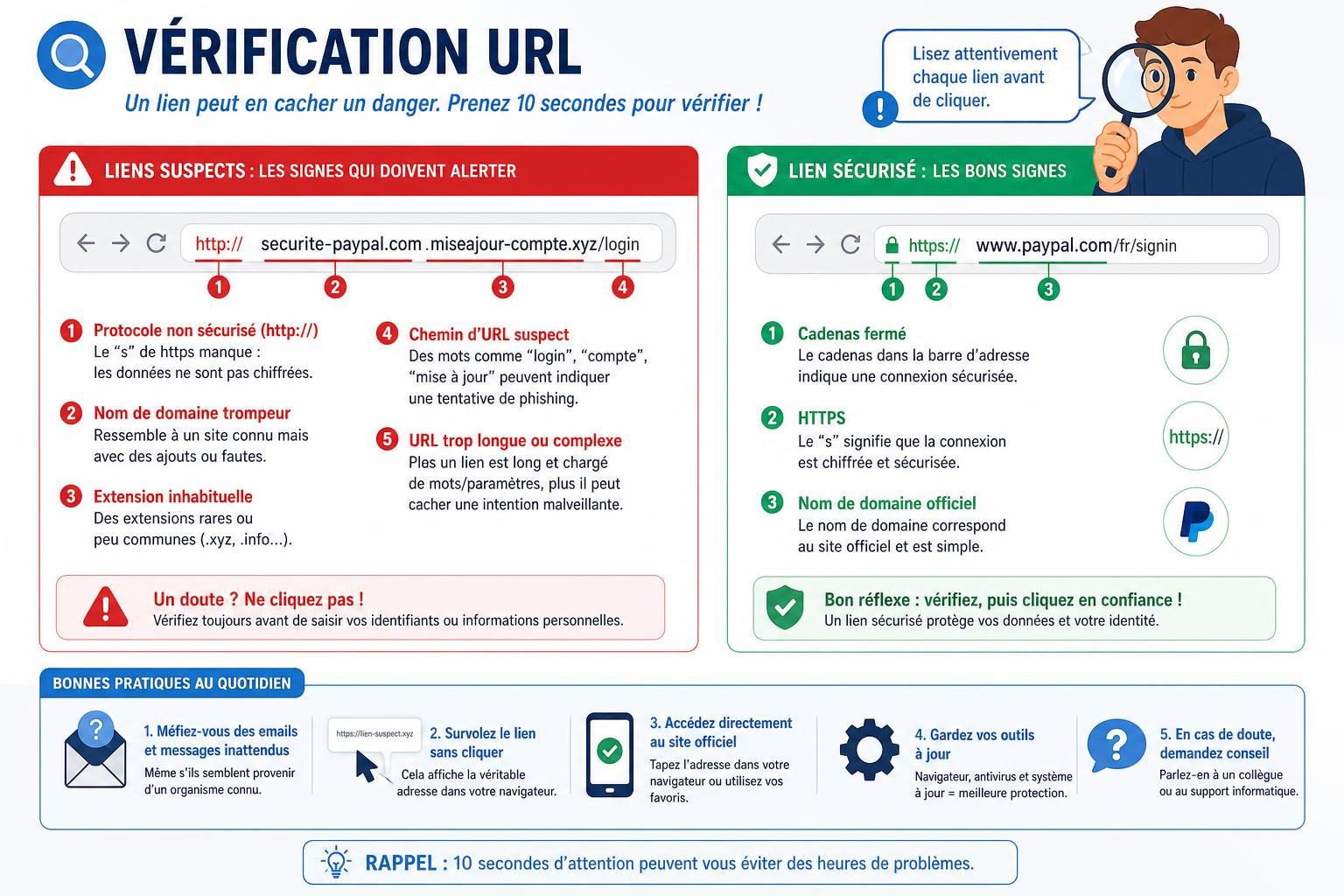
The first step is surprisingly simple: read the URL itself. Many phishing links contain clues that become obvious once you stop looking at the brand name in the message and examine the actual web address.
Attackers frequently use a technique known as typosquatting. They register a domain that resembles a legitimate website by changing, removing or adding characters. A fake address might use a zero instead of the letter “o,” add an extra word or rely on another subtle variation designed to escape a quick glance.
Imagine receiving an email claiming to come from PayPal with a link such as paypal-login-secure.example. Words such as “login,” “verify,” “account” or “secure” do not make the domain legitimate. What matters is the actual registered domain.
Subdomains can make phishing URLs even more deceptive. An address can contain the name of a trusted company while still belonging to someone else. For example, in an address structured like paypal.example.com, the controlling domain is example.com, not PayPal.
Also watch for unusual spelling, unexpected domain extensions, excessive numbers, strange characters and URLs that are unnecessarily complicated. None of these signals proves that a website is malicious, but several warning signs appearing together should make you cautious.
2. Don’t assume HTTPS means a link is safe
One of the most persistent misconceptions about website security is that the padlock icon proves a website is trustworthy.
HTTPS does not tell you whether the person operating a website is legitimate. It tells you that the connection between your browser and that website is encrypted.
That encryption is important, particularly when transmitting passwords, payment information or other sensitive data. But a phishing website can obtain a valid TLS certificate and use HTTPS too.
Think of HTTPS as a secure tunnel between you and a destination. The tunnel may be encrypted perfectly while the destination itself belongs to a scammer.
The absence of HTTPS is therefore a serious reason not to submit sensitive information, but the presence of HTTPS should never be your only test of whether a URL is safe.
3. Scan the suspicious link with a URL checker
If you are unsure about a link, you do not necessarily need to visit it to investigate it. URL safety checkers can analyze a web address using security databases and detection systems.
One well-known example is VirusTotal, which can analyze URLs using information from multiple security vendors. Services such as URLVoid can also provide reputation and blacklist information about a domain.
These tools can help identify URLs that have already been associated with phishing, malware or other malicious activity.
However, a clean result does not guarantee that a link is safe. A newly created phishing page may not yet have been detected or reported. Security databases need evidence before they can flag new threats.
The opposite problem can occur too: automated security systems sometimes produce false positives. Treat a URL scanner as one source of evidence rather than an infallible verdict.
4. Be careful with shortened and redirected URLs
Shortened links are useful because they transform long web addresses into compact URLs. The downside is obvious: you may no longer be able to see where the link actually leads.
Services such as Bitly and TinyURL are legitimate and widely used, so a shortened link is not automatically dangerous. The problem is that the same technology can also be used to conceal a malicious destination.
If an unexpected message contains a shortened URL, avoid treating the shortened domain itself as evidence of trust. When possible, preview or expand the URL before visiting the destination.
Multiple redirects deserve similar caution. Redirects are common across legitimate websites, advertising platforms and tracking systems, but attackers can also use chains of redirects to obscure the final page.
Context matters. A shortened link sent by someone you know and were expecting is very different from an unsolicited “Your account will be suspended today” message containing an unknown shortened URL.
5. Look for the classic signs of a phishing link
Phishing works because attackers do more than create deceptive URLs. They create a situation designed to make you click before thinking.
Urgency is one of the most common warning signs. Messages may claim that your account has been compromised, a payment has failed, a package cannot be delivered or your password will expire unless you act immediately.
Fear is not the only tactic. Attackers can also exploit curiosity and reward: an unexpected refund, prize, invoice, job offer or document may be used to encourage a click.
Be especially suspicious when several signals appear together:
- An unexpected request to log in or verify your account
- Pressure to act immediately
- A domain that differs from the company’s official domain
- An unexpected payment, refund or delivery problem
- A request for passwords, card details or authentication codes
- A shortened or heavily disguised URL
A professional-looking email does not prove authenticity either. Logos, colors and website designs can be copied easily, and AI tools can help scammers produce more natural-looking messages.
6. Open the official website yourself instead of using the link
This is one of the simplest and most effective habits you can adopt.
If an email from your bank says there is a problem with your account, do not use the link in the email to investigate the problem. Open your bank’s official app or manually navigate to its known website instead.
The same principle applies to delivery companies, online stores, streaming platforms, social networks and payment services.
If the warning is legitimate, the relevant notification will often also be visible inside your authenticated account. If nothing appears there, that discrepancy gives you another reason to question the original message.
For frequently used services, bookmarks can reduce the risk further. Instead of relying on links delivered through email or SMS, access important accounts through a bookmark you created from the legitimate website.
Suspicious URL warning signs: quick comparison
| Suspicious link type | What to look for | Recommended action |
|---|---|---|
| Lookalike or typosquatted domain | Misspellings, substituted characters or extra words around a familiar brand | Do not click. Navigate to the official website independently |
| Unknown shortened URL | The final destination is hidden behind a URL-shortening service | Preview or expand the URL before visiting it |
| HTTP page requesting sensitive information | The connection is not protected by HTTPS | Do not submit passwords, payment details or personal information |
| Misleading subdomain | A trusted brand appears before a different controlling domain | Identify the actual registered domain before proceeding |
| Unexpected login link | A message asks you to sign in urgently to solve a problem | Open the official app or website independently |
| Multiple or hidden redirects | The link passes through several destinations before reaching the final page | Scan or investigate the URL before opening it |
Can you check if a link is safe without clicking it?
Yes. In many cases, you can investigate a suspicious URL without directly opening the destination.
On a computer, hover your mouse over a hyperlink to inspect the destination shown by your browser or email client. On mobile devices, pressing and holding a link may display a preview or destination, although behavior varies between apps.
You can then inspect the domain manually or submit the URL to a reputable security scanner.
Be careful when copying suspicious URLs. Avoid accidentally opening them, and never paste confidential information into a third-party analysis service. Some URL-scanning services may share submitted URLs with security researchers or partners, so sensitive private links should be handled cautiously.
Does a new domain mean a website is dangerous?
No. Domain age can provide context, but a recently registered domain is not automatically malicious. Every legitimate new business and website starts with a new domain.
At the same time, attackers frequently create disposable domains for short-lived phishing campaigns. A very recent registration can therefore become relevant when combined with other warning signs, such as impersonating a major brand, requesting credentials and using an unexpected domain.
The same reasoning applies to hosting location. A website’s server location alone is not reliable evidence that it is malicious. Legitimate websites use infrastructure around the world, and attackers can host malicious pages through reputable cloud providers.
Security decisions should be based on multiple independent signals, not stereotypes about a country, hosting provider or domain age.
What should you do if you already clicked a suspicious link?
Clicking a suspicious link does not automatically mean your device or account has been compromised. What you did after opening the page matters.
If you only opened the page and did not enter information, download a file, install software or approve a browser prompt, the risk may be lower. Close the page and make sure your browser and operating system are up to date.
If you entered a password on a suspicious website, change that password immediately through the legitimate service. If the same password is reused elsewhere, change it on those accounts too. Enable multi-factor authentication where available.
If you entered payment information, contact your bank or card provider through its official channels and follow its security guidance.
If a file was downloaded or executed, or if you suspect malware was installed, use your operating system’s security tools or a reputable security product to investigate the device. For a company-owned device, contact your IT or security team rather than attempting to conceal the incident.
How to make checking suspicious URLs a habit
The best protection is not memorizing hundreds of phishing techniques. It is developing a short routine that interrupts the instinct to click immediately.
When an unexpected link arrives, ask three questions: Was I expecting this message? Does the real domain match the organization it claims to represent? Is the message trying to rush me into doing something?
If anything feels inconsistent, stop. Inspect the URL, check it with a reputable scanner when appropriate, and access the supposed sender’s service independently.
This matters in businesses too. Employees should know how to report suspicious emails and messages instead of simply deleting them. A reported phishing attempt can help security teams protect other people in the organization who may have received the same attack.
Attack techniques will continue to evolve, but the core defensive principle remains remarkably durable: verify the destination before trusting the message.
Check suspicious URL FAQ
How can I check if a URL is safe?
Inspect the real domain name, look for suspicious spelling or subdomains, consider whether you expected the message and use a reputable URL scanner when necessary. No single test can guarantee that a URL is completely safe.
Can I check a suspicious URL without clicking it?
Yes. Hover over the link on a computer or use your mobile device’s link-preview functionality where available. You can also carefully copy the address and analyze it with a reputable URL-scanning service.
Does HTTPS mean a website is safe?
No. HTTPS means the connection is encrypted. It does not prove that the website itself is legitimate. Phishing websites can also use HTTPS certificates.
What is the best way to check a suspicious link?
Combine several signals: inspect the domain, examine the context of the message, look for phishing techniques and use a URL security scanner when necessary. Multiple independent clues are more reliable than any single indicator.
What should I do if I clicked a suspicious link?
Do not panic, but assess what happened. If you entered credentials, change the affected password through the legitimate service. If you entered financial information, contact your bank. If you downloaded or executed a suspicious file, investigate the device using appropriate security tools.
Can VirusTotal tell me if a link is safe?
VirusTotal can provide valuable information by checking a URL against multiple security systems, but a clean result is not a guarantee of safety. Newly created malicious URLs may not yet have been detected.