Is Vizard AI worth using in 2026? With TikTok, Instagram Reels and YouTube Shorts demanding a constant stream of short-form content, turning a one-hour podcast or interview into multiple social clips can quickly become a time-consuming editing job.
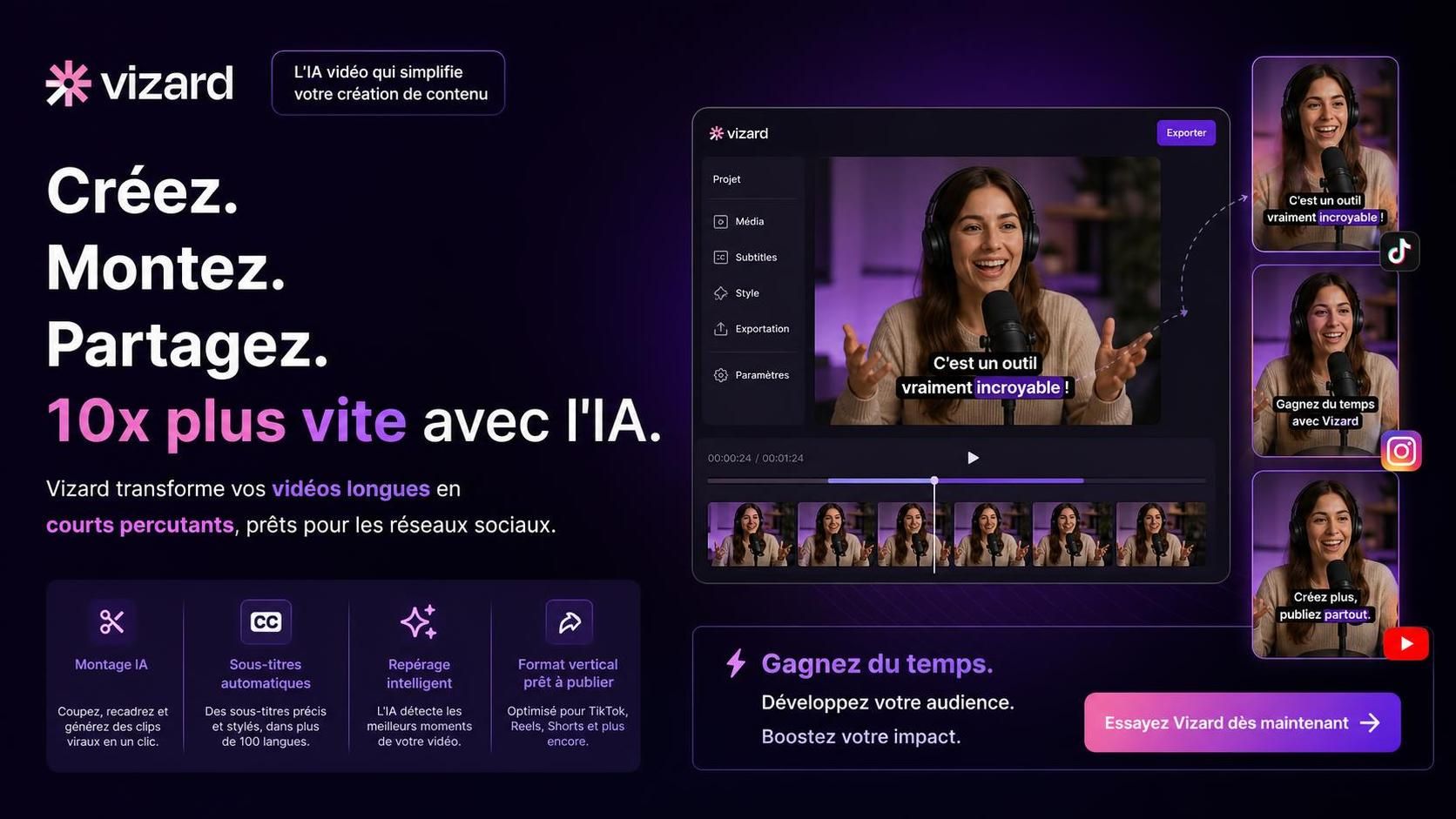
Vizard AI is designed to automate much of that process. Instead of manually reviewing an entire long-form video, creators can use the platform to identify potential highlights, generate short clips, add captions and adapt footage for vertical social formats.
That sounds ideal on paper. But AI clipping tools still require human judgment, and Vizard is not designed to replace every part of a professional video editor. In this Vizard AI review for 2026, we’ll look at what the platform does well, where it falls short, who should use it and whether it can genuinely save enough editing time to justify adding it to your workflow.
In short:
- Vizard turns long-form videos into short social clips, making it particularly relevant for podcasts, interviews, webinars and talking-head content.
- AI clipping, automatic captions and intelligent reframing can reduce the amount of repetitive editing required.
- Human review is still important: an automatically selected clip can miss context, start at the wrong moment or simply fail to capture the strongest part of a discussion.
- Vizard is primarily a content repurposing tool, not a replacement for a full professional video editor.
- Its value depends heavily on how much long-form video you already produce.
- Best fit: podcasters, interviewers, marketers, educators and teams regularly repurposing spoken content for social media.
Table of Contents
What is Vizard AI and how does it work?
Vizard is an AI-powered video repurposing platform built around a simple problem: creators often have hours of useful long-form footage but not enough time to manually transform it into dozens of short videos.
You provide existing video content and Vizard analyzes it to help create shorter clips suitable for platforms such as TikTok, Instagram Reels and YouTube Shorts.
The platform combines several tasks that would otherwise require multiple manual editing steps:
- AI-assisted identification of potentially interesting moments;
- automatic clip creation;
- caption and subtitle generation;
- automatic reframing for social-media formats;
- text-based video editing;
- social-media publishing and workflow tools, depending on the features currently available in your plan.
The central idea is not to generate an entire video from nothing. Vizard’s main strength is repurposing content you already have.
You can check the platform’s current capabilities directly on the official Vizard AI website. Because AI products change quickly, the developer’s current feature and pricing pages should take priority over older third-party reviews.
Vizard AI features: what can it actually do?
The appeal of Vizard comes from combining several repetitive video-editing tasks into one workflow.
| Feature | What It Does | Why It Matters |
|---|---|---|
| AI clipping | Helps identify and extract sections from longer videos | Reduces time spent manually reviewing footage |
| Automatic captions | Generates subtitles for clips | Makes short videos easier to consume without sound |
| Automatic reframing | Adapts footage to vertical and social formats | Reduces repetitive resizing and cropping |
| Text-based editing | Allows parts of a video to be edited through its transcript | Can make basic editing more accessible |
| Social workflow tools | Helps prepare and distribute social content | Can shorten the path from source video to publication |
Where Vizard AI can save the most time
The strongest argument for Vizard is not necessarily that AI can edit better than a skilled human editor. It is that AI can process a large amount of existing material much faster than manually reviewing every minute yourself.
Repurposing podcasts and interviews
This is probably the most obvious use case.
Imagine publishing a 60-minute interview every week. Traditionally, someone needs to watch the recording, identify strong moments, determine where each clip should begin and end, crop it for vertical viewing, add subtitles and export several versions.
An AI clipping workflow can automate or accelerate several of those steps.
That does not eliminate human judgment, but it can move the editor from searching for every potential clip manually to reviewing and improving suggestions.
Turning webinars into social content
Webinars, online courses, presentations and recorded discussions often contain useful material that disappears into an archive after publication.
Vizard can make that archive easier to reuse. A single long recording can potentially provide material for LinkedIn, TikTok, Instagram Reels or YouTube Shorts instead of serving only its original audience.
Creating content at scale
The economics become more interesting as your content volume increases.
If you edit one short video per month, an additional AI platform may add more complexity than value. If your team processes hours of interviews, podcasts or educational videos every week, automating repetitive editing tasks becomes much easier to justify.
Vizard AI’s biggest limitation: AI does not understand everything
The most important limitation of any automated clipping system is simple: a technically valid clip is not necessarily a good clip.
A compelling short-form video often depends on context, timing, narrative tension and an understanding of what the audience already knows. AI can help identify promising segments, but those suggestions still need to be evaluated.
A generated clip might:
- begin after the context needed to understand the point;
- end before the speaker reaches the conclusion;
- select an interesting sentence that makes little sense on its own;
- miss a stronger moment elsewhere in the video;
- require caption corrections for names, technical vocabulary or unusual terminology.
The practical lesson is important: use Vizard to accelerate selection, not to eliminate editorial review.
Is Vizard a replacement for a traditional video editor?
Not necessarily — and that is not really what Vizard needs to be.
A full video editor is designed for detailed creative control over timelines, audio, transitions, effects, color, graphics and complex visual storytelling. Vizard is much more focused on making existing content easier to repurpose.
Think of the difference this way:
| Need | Vizard AI | Traditional Video Editor |
|---|---|---|
| Find clips in a long interview | Strong fit | Manual process |
| Generate captions quickly | Strong fit | Possible, but often more manual |
| Create vertical social clips | Strong fit | Possible with more setup |
| Detailed timeline editing | Limited compared with full editors | Strong fit |
| Complex visual storytelling | Not its main purpose | Strong fit |
| Repurpose many long videos | Strong fit | Potentially time-consuming |
For many creators, the smartest workflow is therefore not Vizard versus a video editor. It is Vizard for the first automated pass, followed by manual editing when a clip deserves additional polish.
Who should use Vizard AI in 2026?
Vizard becomes much easier to evaluate once you look at the type of content you already produce.
Podcasters and interview creators
Excellent fit. Long conversations naturally contain multiple ideas that can potentially become standalone clips. This gives an AI repurposing tool plenty of material to work with.
Marketing and social media teams
Potentially very useful. Teams responsible for maintaining a high publishing cadence can use existing webinars, interviews, product discussions and educational content as raw material for social channels.
Coaches, educators and course creators
Good fit. Educational recordings often contain self-contained explanations, tips and answers that can work well as short clips.
Creators producing highly visual content
More situational. If the meaning of your content depends primarily on movement, cinematic editing, demonstrations or visual storytelling rather than speech, an AI clipping workflow may require considerably more manual intervention.
Vizard vs generative AI tools: understand the difference
It is also important not to confuse AI content repurposing with generative AI.
Vizard primarily helps transform existing video material. Generative tools, by contrast, can create new assets from prompts or other inputs.
For example, if your workflow also requires original illustrations, thumbnails or visual concepts rather than clips extracted from existing footage, see our guide to the best AI tools for creating images. Combining generative-image tools with video repurposing can cover very different stages of a modern content-production workflow.
This distinction matters when comparing AI products. Asking whether Vizard can replace an AI image generator or a text-to-video platform misses its main purpose: Vizard is primarily about extracting more value from video you have already created.
Vizard AI pricing: is the paid plan worth it?
Pricing is one of the areas where you should avoid relying on an old review. AI software companies frequently change their plans, usage limits and included features.
Vizard offers different levels of access, but the important question is not simply how much a plan costs. Ask how much editing time the tool can realistically save you each month.
A useful way to evaluate the subscription is:
- How many hours of long-form video do you process every month?
- How many short clips do you need from each recording?
- How long does manual clipping currently take?
- How much manual correction do Vizard’s outputs still require?
- Does your plan include the export, collaboration and branding features you actually need?
If the platform saves several hours of repetitive editing every month, paying for automation can make economic sense. If you only repurpose an occasional video, the calculation is very different.
Always check Vizard’s official pricing page before subscribing, as plans, limits and features can change.
Vizard AI pros and cons
| Pros | Cons |
|---|---|
| Automates repetitive clip discovery | AI-selected clips still require human review |
| Designed for long-form to short-form repurposing | Not a replacement for a full professional editor |
| Automatic captions | Captions may still require corrections |
| Automatic social-media reframing | Less compelling when content depends heavily on visual action |
| Useful for high-volume content workflows | Subscription value depends heavily on usage volume |
| Accessible to users without advanced editing skills | Creative control is more limited than with traditional editing software |
How Vizard fits into a broader AI content workflow
The most interesting way to use AI in 2026 is rarely to expect one application to do everything.
A creator might record a long podcast, use Vizard to identify potential short clips, manually polish the strongest selections and then use generative tools to create supporting visual assets.
If you are building that kind of workflow, our comparison of AI image creation tools can help with the visual-generation side, while Vizard handles the repurposing of your existing video library.
The goal is not automation for its own sake. The goal is to remove repetitive work while keeping human attention focused on the decisions that actually affect quality.
Vizard AI review: our verdict for 2026
Vizard makes the most sense when you already have more long-form video than you have time to repurpose.
Podcasts, interviews, webinars, educational videos and talking-head content give the platform exactly the kind of source material an AI clipping workflow can exploit efficiently.
Its value is less obvious if you rarely create long videos or if your content relies heavily on sophisticated visual editing. In those situations, Vizard may solve a problem you do not actually have.
Most importantly, do not treat AI-generated clips as finished content by default. Review the context, opening hook, ending, captions and framing before publication.
The right question is not whether Vizard can replace your editor. It is whether Vizard can eliminate enough repetitive editing to let you spend more time creating.
Vizard AI FAQ
Is Vizard AI worth it in 2026?
It can be if you regularly turn podcasts, interviews, webinars or other long-form videos into short social clips. The more repetitive editing Vizard removes from your workflow, the easier its cost becomes to justify.
Is Vizard AI good for beginners?
Yes. Its automation makes several editing tasks accessible without advanced video-editing experience. However, beginners should still review every generated clip and caption before publishing.
What does Vizard AI do?
Vizard helps transform existing long-form videos into shorter content using AI-assisted clipping, automatic captions, social-media reframing and text-based editing.
Can Vizard AI create videos from scratch?
That is not its primary purpose. Vizard is mainly a video repurposing tool designed to extract more content from videos you have already produced.
What are the main limitations of Vizard AI?
Automatically selected clips can sometimes need contextual or timing adjustments, captions may require corrections and the platform provides less detailed creative control than a full professional video editor.
Who should use Vizard AI?
Podcasters, interview creators, educators, marketers and social-media teams are among the strongest use cases, particularly when they regularly produce long-form spoken content.