Need to send 10GB file for free? Email attachments are far too limited for files this large, and many popular file-sharing services require a paid subscription once you exceed their free transfer limits.
Fortunately, several online services make it possible to send large files for free without relying on email or paying for permanent cloud storage. Depending on the platform, you can transfer 10GB, 50GB or even larger files through a temporary download link.
But maximum file size is not the only thing that matters. Upload speed, encryption, link expiration, account requirements and transfer reliability can make a huge difference when you are sending several gigabytes of data.
If you are wondering how to send a 10GB file for free, here are 7 tools worth considering in 2026, along with practical tips to make large file transfers faster, safer and more reliable.
In short:
- SwissTransfer is particularly attractive for very large free transfers, with a generous file-size allowance.
- Smash is another flexible option for sending large files without relying on traditional cloud storage.
- Some popular free services, including WeTransfer, may not offer enough capacity on their free plans for a single 10GB transfer.
- Your upload speed is often the biggest bottleneck. A 10GB transfer can take minutes on fast fiber or several hours on a slow connection.
- For confidential files, check whether the service provides end-to-end encryption rather than relying only on encryption in transit.
- Free plans and transfer limits can change, so check the provider’s current limits before uploading an important 10GB file.
Table of Contents
7 best tools to send a 10GB file for free in 2026
Sending a large file online becomes more complicated once you move beyond a few gigabytes. Traditional email services are not designed for attachments anywhere near 10GB, while many cloud and transfer platforms impose limits on free users.
Dedicated large-file transfer services solve this problem by uploading your file to their infrastructure and generating a temporary link that you can send to the recipient.
1. SwissTransfer: a strong choice for very large free transfers
SwissTransfer stands out because of its generous free transfer capacity. This makes it particularly suitable for sending a 10GB video, archive, project folder or other large file without immediately moving to a paid plan.
The service also allows files to remain available for a limited period, making it useful when the recipient cannot download the transfer immediately.
For European users in particular, SwissTransfer is an interesting alternative to the best-known international file-transfer platforms.
Best for: users who need a simple free solution for files well above 10GB.
2. Smash: flexible large-file sharing
Smash is another popular option for transferring large files online. Its approach is particularly interesting for users who occasionally need to send unusually large files and do not want to maintain permanent cloud storage.
Free transfers may be subject to different processing or speed conditions depending on file size and the platform’s current policy, so it is worth checking the latest limits before starting a time-sensitive upload.
Best for: occasional very large transfers where flexibility matters more than permanent storage.
3. HexaTransfer: an option focused on large-file transfers
HexaTransfer is another service designed around sending large files online. According to the service information presented in this comparison, it supports transfers around the 10GB range and emphasizes encrypted file sharing.
For confidential material, the important question is not simply whether a website uses HTTPS. You should verify exactly how files are encrypted, where encryption occurs and who can access the decryption key.
Best for: users looking for a dedicated large-file transfer service with a strong emphasis on encryption.
4. pCloud Transfer: simple file sharing for smaller transfers
pCloud Transfer offers a straightforward interface for sending files without using email attachments. However, depending on the current free-plan limit, it may not be suitable for sending a complete 10GB file in a single transfer.
It can still be useful if you split a large archive into smaller parts or if your actual file is below the service’s free transfer limit.
Best for: simple transfers below the maximum allowed by the free plan.
5. Filemail: designed specifically for file transfers
Filemail focuses specifically on transferring files rather than acting primarily as a cloud-storage platform. This makes the workflow relatively simple: upload your files, generate or send the transfer, and let the recipient download them.
Free-plan limits can make a difference for a 10GB transfer, so check the current maximum before beginning your upload.
Best for: users who prefer a dedicated file-transfer interface.
6. WeTransfer: extremely simple, but check the free limit
WeTransfer is one of the most recognizable names in online file sharing because of its simple interface and minimal setup.
However, popularity does not automatically make it the best choice for a 10GB file. The amount you can send for free depends on the current WeTransfer plan and transfer restrictions.
If the free allowance is below your file size, you will need to split the file, choose another service or move to a paid option.
Best for: straightforward transfers that remain within the current free allowance.
7. Dropbox Transfer: useful inside the Dropbox ecosystem
Dropbox Transfer can be convenient for users already working within Dropbox, particularly when files need to be delivered rather than collaboratively edited.
For a 10GB file, however, you need to pay close attention to the transfer limit included with your current account. Free allowances may be considerably smaller than 10GB.
Best for: existing Dropbox users whose transfer fits within their account limits.
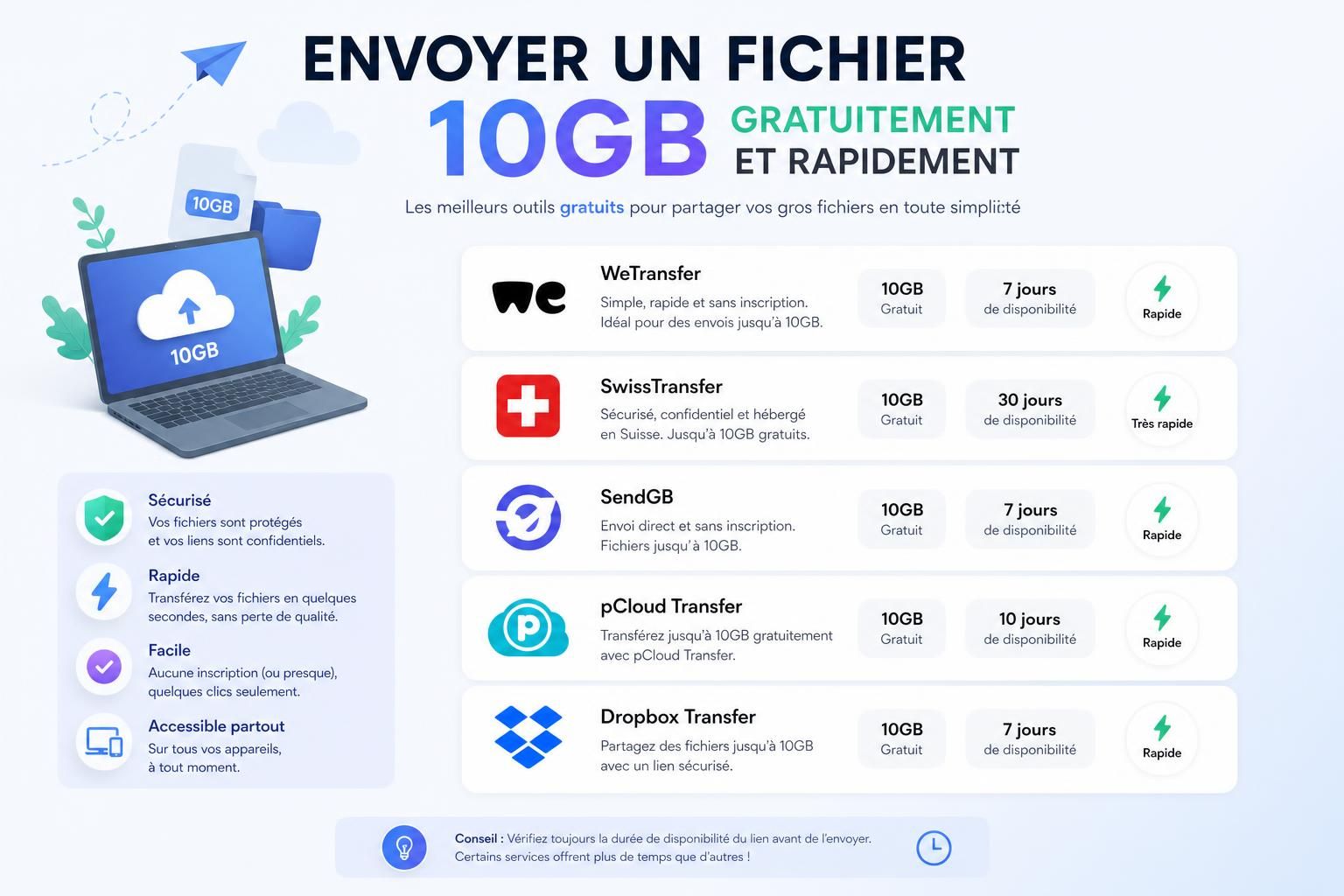
Best free services for sending a 10GB file compared
| Service | Suitable for 10GB? | Best for | Encryption | What to check |
|---|---|---|---|---|
| SwissTransfer | Yes | Very large free transfers | Encrypted transfer | Current maximum size and retention period |
| Smash | Potentially | Flexible large-file sharing | Encrypted transfer | Current free-transfer conditions |
| HexaTransfer | According to the service, yes | Encrypted large-file transfers | Encryption-focused | Current limits and encryption implementation |
| pCloud Transfer | Depends on current limit | Simple file transfers | Encrypted transfer | Free maximum file size |
| Filemail | Depends on current limit | Dedicated file transfers | Encrypted transfer | Free-plan allowance |
| WeTransfer | Depends on current free plan | Ease of use | Encrypted transfer | Free transfer limit |
| Dropbox Transfer | Depends on account | Dropbox users | Encrypted transfer | Transfer allowance for your plan |
Important: file-transfer services frequently change their free limits, retention periods and paid plans. Always confirm the provider’s current conditions before uploading a large or time-sensitive file.
How long does it take to upload a 10GB file?
The service you choose matters, but your own upload speed is often the biggest factor determining how long a 10GB transfer takes.
This distinction is important because internet providers often advertise download speed much more prominently than upload speed. A connection marketed as extremely fast can still have a much slower upstream connection.
In ideal conditions, the approximate theoretical upload time for a 10GB file is:
- 1 Gbps upload: roughly 1.5 minutes
- 500 Mbps upload: roughly 3 minutes
- 100 Mbps upload: roughly 14 minutes
- 20 Mbps upload: roughly 1 hour and 10 minutes
- 5 Mbps upload: roughly 4.5 hours
Real-world transfers can take longer because of protocol overhead, Wi-Fi conditions, server load, routing, other devices using your connection and limits imposed by the transfer service.
Before starting an important transfer, run an internet speed test and look specifically at your upload speed.
Why large file uploads sometimes fail
A 10GB upload can run for minutes or even hours, which creates plenty of opportunities for a temporary network problem to interrupt the transfer.
Modern upload systems can reduce this risk by splitting large files into smaller chunks. Instead of treating a 10GB file as one enormous operation, the service uploads multiple smaller pieces and reconstructs them afterward.
If one part fails, a properly designed resumable upload system may only need to retry the missing portion rather than starting the entire 10GB transfer again.
This is particularly valuable on unstable connections. When comparing large-file transfer platforms, resumable uploads can matter as much as raw upload speed.
Should you split a 10GB file before sending it?
Usually, you do not need to split a 10GB file if your transfer service accepts it directly and supports reliable resumable uploads.
Splitting can still be useful when a service imposes a smaller file-size limit or when your connection is unreliable. For example, a 10GB archive could be divided into two or more smaller parts.
On Windows, tools such as 7-Zip can create multipart archives. On macOS and Linux, command-line tools can also divide large files into smaller pieces.
The disadvantage is convenience: the recipient must download every part and reconstruct the original file correctly. For non-technical recipients, a service capable of handling the full file directly is usually preferable.
Should you compress a 10GB file before uploading it?
Compression can help, but the result depends heavily on the type of file.
Many video, audio and image formats are already compressed. Putting an MP4, JPEG or another compressed archive inside a ZIP file may therefore save very little space.
Uncompressed documents, datasets, source files and certain image formats can sometimes benefit much more from compression.
For a one-off transfer, test compression before committing to it. Spending a long time creating an archive only to reduce a 10GB file by a few megabytes provides little practical benefit.
How to make a 10GB file transfer faster and more reliable
Once you have chosen a service, a few simple changes can significantly improve the reliability of a large upload.
- Use Ethernet when possible: a wired connection is generally more stable than Wi-Fi for a long transfer.
- Pause unnecessary cloud synchronization: Dropbox, OneDrive, Google Drive and backup software can compete for upload bandwidth.
- Avoid moving between networks: switching Wi-Fi networks during a large upload can interrupt the connection.
- Keep your computer awake: make sure sleep settings do not interrupt a long transfer.
- Check your upload speed first: this gives you a realistic idea of how long the transfer should take.
- Use resumable uploads when available: they reduce the cost of temporary network failures.
How to send a 10GB file securely
Large files are often more than entertainment. A 10GB transfer might contain professional video footage, design files, business documents, customer data or an important archive.
That makes security an important part of choosing a file-transfer service.
Encryption in transit vs end-to-end encryption
Encryption in transit protects data while it travels between your device and the service’s servers. HTTPS and TLS are commonly used for this purpose.
End-to-end encryption can provide a different level of protection when implemented correctly because the content is encrypted so that the intermediary service cannot simply read the file contents using a server-controlled key.
If you are transferring genuinely sensitive information, do not rely on marketing language alone. Check the provider’s documentation to understand whether encryption is end-to-end, how keys are managed and whether files are encrypted at rest.
Use password protection when appropriate
If the service supports password-protected transfers, this can add another useful layer of protection. Send the password through a different communication channel rather than placing it in the same email as the download link.
Check how long the file remains online
Temporary transfer links are useful because files do not necessarily remain accessible indefinitely. For sensitive material, choose an expiration period that gives the recipient enough time to download the file without keeping it online longer than necessary.
How to make downloading easier for the recipient
A successful upload is only half of the transfer. Your recipient still needs to download 10GB of data.
- Make sure the recipient has at least 10GB of available storage, preferably more.
- Tell them how long the download link will remain active.
- Use a clear file name so the recipient knows exactly what they are downloading.
- For important transfers, confirm that the recipient successfully downloaded the complete file.
- For confidential files, communicate passwords or decryption information separately.
A little preparation can prevent a 10GB transfer from turning into another several-hour upload because a link expired or the recipient could not identify the correct file.
What’s the best way to send a 10GB file for free?
For a one-time transfer, a dedicated large-file sharing service is generally more convenient than uploading the file to permanent cloud storage.
SwissTransfer is one of the most interesting options to investigate first when you need enough free capacity for a 10GB file. Smash can also be worth considering for unusually large transfers, while other platforms may work depending on their current free-plan limits.
If you exchange large files regularly with the same people, the equation changes. A shared cloud-storage platform may become more practical because files can remain synchronized instead of being repeatedly uploaded through temporary transfer links.
Whatever service you choose, remember that maximum file size is only one part of the decision. Upload reliability, security, expiration time and your own internet connection can matter just as much.
Send 10GB file for free FAQ
How can I send a 10GB file for free?
Use a large-file transfer service whose current free allowance supports at least 10GB. SwissTransfer is one option worth checking first for large free transfers. Always verify the latest limit before uploading because free plans can change.
Can I send a 10GB file for free without registration?
Some large-file transfer platforms allow substantial transfers without requiring a full account. However, registration requirements and free allowances change over time, so confirm the current conditions before beginning a 10GB upload.
How long does it take to upload a 10GB file?
It depends mainly on your upload speed. In ideal conditions, a 100 Mbps upload connection needs roughly 14 minutes, while 20 Mbps takes around 70 minutes. Real-world performance may be slower.
Can I send a 10GB file through email?
Not as a conventional attachment. A 10GB file is far beyond normal email attachment limits. The practical solution is to upload the file to a transfer service and send the recipient a download link.
Should I compress a 10GB file before sending it?
Only when compression provides a meaningful reduction. Video, JPEG images and existing archives are often already compressed, while uncompressed documents, datasets and other raw files may shrink considerably more.
What is the safest way to send a large file?
Use a reputable transfer provider, understand how it encrypts and stores your files, choose an appropriate expiration period and use password protection when available. For highly sensitive files, verify whether the service provides genuine end-to-end encryption.