WordPress vs Webflow: which platform should you choose to build a website in 2026? Both are powerful options, but they approach website creation from fundamentally different directions.
WordPress is an open-source content management system known for its enormous ecosystem, flexibility and control. Webflow is a hosted visual website-building platform that combines design, CMS, hosting and site management within a more integrated environment.
The right choice depends on what you are building. A content-heavy publication, an ecommerce store, a marketing website and a highly customized web project do not have the same technical requirements. Cost, maintenance, SEO, performance and the skills available within your team also matter.
In this WordPress vs Webflow comparison, we look at design, ease of use, SEO, performance, security, pricing and scalability to determine which platform makes the most sense for different types of websites in 2026.
In short:
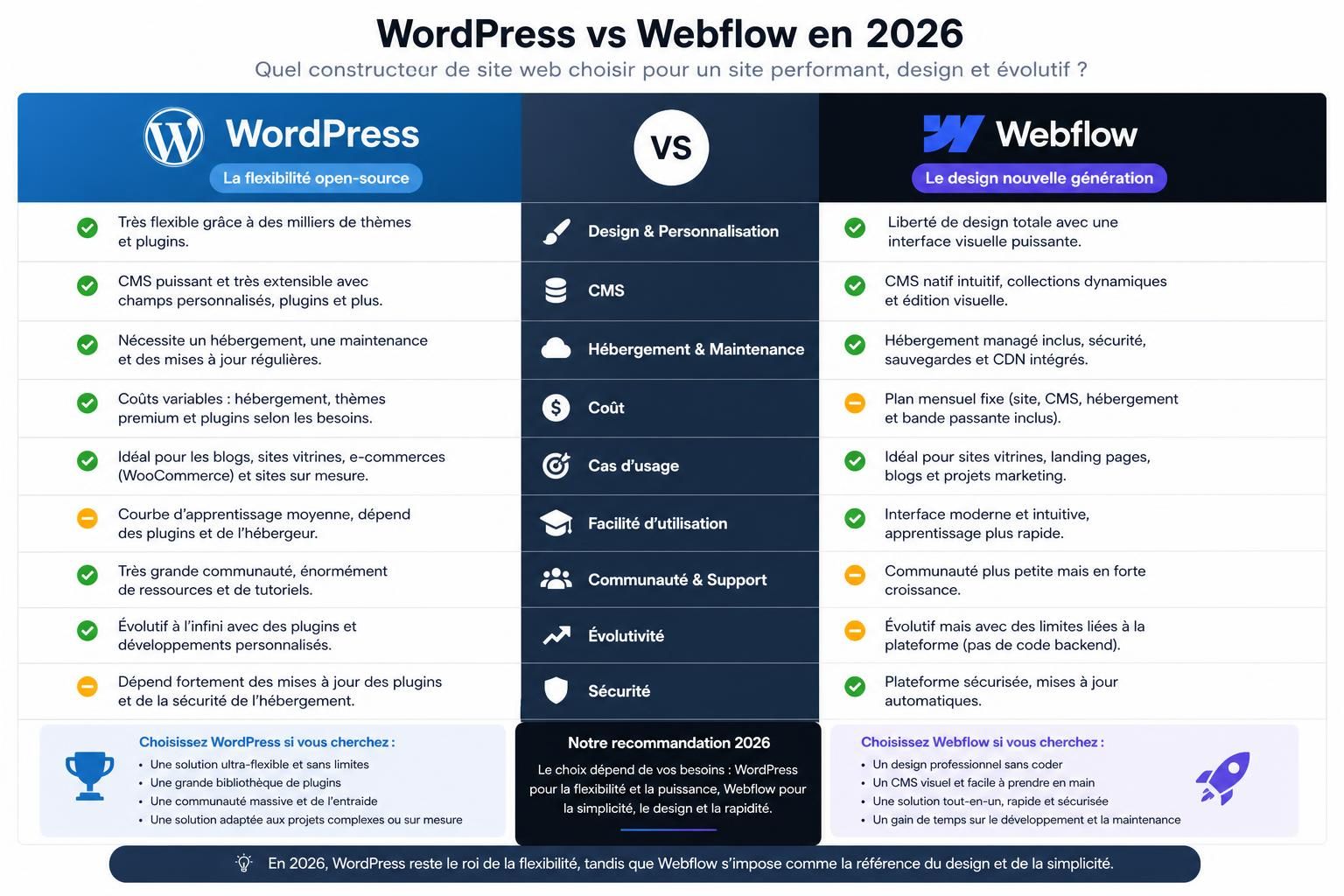
- WordPress offers greater extensibility and control, with thousands of themes and plugins and the ability to choose your own hosting infrastructure.
- Webflow provides a more integrated experience, combining visual design, CMS, hosting and platform maintenance.
- WordPress is particularly strong for content-heavy and highly customized projects where extensibility matters.
- Webflow is particularly attractive to designers and marketing teams that want visual control without managing a traditional WordPress stack.
- Both platforms can support strong SEO and fast websites when properly configured.
- The biggest difference is ultimately control versus integration: WordPress gives you more freedom, while Webflow manages more of the technical environment for you.
Table of Contents
WordPress vs Webflow: what’s the biggest difference?
The fundamental difference between WordPress and Webflow comes from their architecture.
WordPress is open-source software. You can install it on the hosting provider of your choice, modify its code, install themes and plugins, connect external services and build highly customized websites.
Webflow is a hosted platform. Website building, CMS functionality, hosting and much of the underlying technical infrastructure are provided within the same ecosystem.
This distinction influences almost everything else: maintenance, security, pricing, scalability and how much technical responsibility falls on the website owner.
WordPress: maximum flexibility with more responsibility
WordPress can power everything from a simple blog to a large publication, corporate website, membership platform or ecommerce store using WooCommerce.
Its greatest strength is extensibility. The ecosystem contains a huge selection of plugins and themes, while developers can build custom functionality when an existing solution does not meet the project’s requirements.
You also control the hosting environment. This means you can choose infrastructure according to your budget, traffic, geographic audience and performance requirements.
But that freedom comes with responsibility. WordPress itself, themes and plugins need to be maintained. Compatibility issues can occur, poorly maintained extensions can introduce security risks, and performance depends heavily on the quality of the hosting and technical configuration.
WordPress therefore gives you more control over the stack, but also more of the responsibility for managing it.
Webflow: an integrated platform built around visual development
Webflow approaches website creation differently. Hosting, CMS functionality, visual design tools and much of the platform infrastructure are managed within one environment.
Its visual designer gives users detailed control over HTML and CSS concepts through a graphical interface. Designers can build responsive layouts, animations and interactions without writing every line of front-end code manually.
This makes Webflow particularly appealing to design and marketing teams that want substantial control over their website without maintaining a traditional collection of themes, plugins and hosting services.
The trade-off is that you operate within Webflow’s ecosystem. You do not have the same freedom to change the underlying hosting environment or extend the platform in every way that an open-source system allows.
The choice can therefore be summarized as flexibility and ownership of the technical stack with WordPress versus a more centralized and managed workflow with Webflow.
WordPress vs Webflow for ease of use
Neither WordPress nor Webflow is universally easier to use. The answer depends heavily on what you are trying to accomplish and how comfortable you are with web design concepts.
Building a website with WordPress
Modern WordPress websites can be built in several ways. You can use the native block editor, install a visual page builder such as Elementor, Divi or Bricks, use a pre-built theme or develop a completely custom theme.
This gives users enormous choice, but it also means the WordPress experience can vary dramatically from one website to another.
A carefully configured WordPress website can be straightforward to manage. A website built around numerous overlapping plugins and page builders can become considerably more complicated.
For non-technical users, the challenge is therefore not necessarily WordPress itself. It is choosing a coherent combination of hosting, theme, plugins and editing tools.
Building a website with Webflow
Webflow provides a much more unified design environment. Instead of assembling different tools, users work within an interface built around visual web development.
That does not necessarily mean there is no learning curve. Understanding concepts such as the CSS box model, classes, positioning, responsive breakpoints and layout systems can make a major difference when using Webflow seriously.
Once those concepts are understood, Webflow provides designers with precise visual control while removing much of the infrastructure management associated with a self-hosted CMS.
For marketers making content changes, Webflow can feel highly streamlined. For developers building unusual functionality, WordPress may provide considerably more freedom.
WordPress vs Webflow for design
Design is one of Webflow’s strongest areas.
Its visual editor is closely connected to the underlying principles of HTML and CSS, giving designers detailed control over spacing, typography, layouts, responsive behavior, animations and interactions.
This can make Webflow particularly efficient for custom marketing websites where visual identity and interaction design are major priorities.
WordPress can achieve equally sophisticated designs, but the workflow depends on how the website is built.
A custom WordPress theme gives developers enormous control. Visual builders can also make sophisticated designs accessible without building everything from scratch. However, the quality and performance of the final website depend heavily on the tools and implementation chosen.
The difference is therefore less about what is theoretically possible and more about how you get there.
- WordPress: extremely flexible, with multiple approaches to design and development.
- Webflow: highly integrated visual design workflow with detailed front-end control.
- Best for visual designers: Webflow is particularly compelling.
- Best for unrestricted customization: WordPress has the advantage because developers control more of the stack.
WordPress vs Webflow for performance and Core Web Vitals
Website performance matters for both user experience and search visibility, but neither platform automatically guarantees excellent Core Web Vitals.
Webflow benefits from a managed hosting environment and removes many of the variables that can make WordPress performance unpredictable. Users do not need to choose a separate hosting provider or assemble their own caching stack.
This can make it easier to achieve a strong performance baseline, particularly for relatively straightforward marketing websites.
WordPress performance varies much more widely. A lightweight theme running on high-quality hosting with optimized images, caching and carefully selected plugins can be extremely fast.
On the other hand, weak hosting, unnecessary plugins, poorly optimized themes, oversized images and excessive third-party scripts can significantly reduce performance.
The key distinction is therefore consistency. Webflow controls more of the performance environment, while WordPress gives you more control over how that environment is built.
WordPress vs Webflow for SEO
Both WordPress and Webflow can support a strong SEO strategy. Choosing one platform over the other will not automatically make a website rank higher on Google.
WordPress SEO
WordPress has one of the most mature SEO ecosystems available. Plugins such as Yoast SEO and Rank Math can help manage titles, meta descriptions, XML sitemaps, canonical settings, structured data and other optimization tasks.
Advanced users can go considerably further by modifying templates, adding custom schema, controlling internal linking systems and integrating specialized SEO tools.
This flexibility is particularly useful for large publishing projects or websites with unusual technical SEO requirements.
Webflow SEO
Webflow includes many essential SEO controls directly within the platform. Users can manage titles and meta descriptions, indexing settings, redirects, sitemaps and other important elements without installing a separate SEO plugin.
For marketing teams, having these controls integrated into the platform can simplify everyday optimization and reduce the number of moving parts.
However, the absence of plugins does not inherently make Webflow better for SEO, just as installing an SEO plugin does not automatically make WordPress rank better.
Content quality, search intent, site architecture, internal linking, backlinks, crawlability and performance remain much more important than the CMS logo.
WordPress vs Webflow: SEO, performance and security
| Criteria | WordPress | Webflow |
|---|---|---|
| Performance | Can be excellent but depends heavily on hosting and configuration | Managed infrastructure provides a more consistent baseline |
| SEO | Extremely extensible with plugins and custom development | Essential SEO controls integrated directly into the platform |
| Security | Depends on hosting, updates, plugins and site management | Much of the platform infrastructure is managed by Webflow |
| Maintenance | Core, themes, plugins and infrastructure may require ongoing attention | Much of the technical platform maintenance is handled centrally |
| Technical control | Very high | More restricted by the managed platform |
WordPress vs Webflow for security
Security is another area where the architectural difference between the two platforms matters.
With a self-hosted WordPress website, security is shared across several components: WordPress itself, your hosting provider, themes, plugins, user accounts and your own configuration.
The popularity of WordPress also makes vulnerable plugins and poorly maintained installations attractive targets. Keeping software updated, limiting unnecessary extensions, using strong authentication and choosing reputable hosting are therefore important.
This does not mean WordPress is inherently insecure. A properly maintained WordPress installation can be highly secure. The issue is that the owner has more responsibility for maintaining that security.
Webflow centralizes more of the infrastructure. Users do not manage a traditional server environment or maintain a collection of third-party WordPress plugins.
That reduces certain categories of maintenance and security risk, although no online platform should be considered immune to security incidents.
WordPress vs Webflow pricing: which costs less?
Comparing WordPress and Webflow pricing is difficult because their business models are fundamentally different.
WordPress costs
The WordPress software itself is open source and free to use, but running a professional website can involve several additional expenses.
- Web hosting
- Domain registration
- Premium themes or page builders
- Premium plugins
- Backups and security services
- Developer or maintenance costs
A simple WordPress website can therefore be inexpensive, while a sophisticated professional installation can cost considerably more.
Webflow costs
Webflow uses a subscription-based model. Hosting and platform infrastructure are bundled into the service, making costs more centralized and potentially easier to predict.
The trade-off is that you remain dependent on Webflow’s pricing structure and plan limitations. As your website grows or requires additional features, you may need to move to a higher plan or add other services.
Instead of asking which platform has the cheapest entry price, compare the total cost of ownership over several years.
Include hosting, subscriptions, plugins, development, maintenance and the amount of internal time required to operate the website.
WordPress vs Webflow for content-heavy websites
WordPress has a major historical advantage in content management. It was originally built around publishing and has developed into an extremely mature CMS.
For websites publishing hundreds or thousands of articles, WordPress provides an enormous ecosystem for editorial workflows, SEO, structured content, internal linking, user management and custom content types.
Webflow also includes CMS functionality and can handle sophisticated structured content, particularly for marketing websites and design-led content projects.
However, teams planning very large editorial operations should compare their specific content requirements carefully before committing to either platform.
For publishing-heavy projects, WordPress remains particularly compelling because of its mature CMS ecosystem and extensibility.
WordPress vs Webflow for marketing teams
Webflow’s workflow can be particularly attractive to marketing teams.
Once the site’s design system and CMS structure are established, marketers can publish landing pages, modify content and manage campaigns without necessarily involving a developer in every routine update.
This separation between initial technical setup and everyday marketing work can reduce bottlenecks for organizations that frequently launch new pages.
WordPress can provide a similar level of autonomy when configured correctly, particularly with block-based editing or a carefully chosen page builder.
The difference is that WordPress environments vary dramatically. One WordPress website may be extremely easy for marketers to manage, while another may depend heavily on developers because of its custom architecture.
WordPress vs Webflow for ecommerce
If ecommerce is a major part of your project, the comparison becomes more nuanced.
WordPress can be transformed into a powerful ecommerce platform with WooCommerce. Its ecosystem provides extensive options for payment gateways, shipping, subscriptions, product management and specialized integrations.
This makes WordPress particularly flexible for stores requiring unusual functionality or deep customization.
Webflow also supports ecommerce, with the advantage of integrating store design into its visual development environment. This can work well for design-focused stores with relatively straightforward requirements.
However, businesses planning complex ecommerce operations should evaluate platform limitations, integrations and long-term scalability carefully.
If ecommerce is the primary purpose of the business, it may also be worth comparing both platforms with a dedicated ecommerce solution rather than assuming WordPress or Webflow is automatically the best choice.
Can you migrate from WordPress to Webflow?
Yes, but moving from WordPress to Webflow is not simply a matter of clicking an export button.
The two platforms use different architectures, so a migration generally involves auditing existing content, rebuilding the design, transferring CMS data and reconnecting third-party integrations.
SEO requires particular attention.
If URLs change during the migration, permanent 301 redirects should map old URLs to their most relevant new destinations. Titles, meta descriptions, canonical tags, structured data, internal links and indexation settings should also be checked.
Before migration, create an inventory of the pages that currently receive organic traffic and backlinks. Those pages deserve particular attention because migration errors can affect existing search visibility.
The time required depends on the size and complexity of the website. A relatively simple marketing website can be much easier to migrate than a large publication with thousands of articles, custom post types and specialized integrations.
WordPress vs Webflow: which should you choose in 2026?
There is no universal winner. WordPress and Webflow solve overlapping problems through different approaches.
Choose WordPress if:
- You want maximum control over your website and hosting.
- You need extensive plugins or custom functionality.
- You are building a large content-driven website.
- You expect unusual integrations or technical requirements.
- You have access to technical expertise or are comfortable managing the platform.
Choose Webflow if:
- You want a managed platform with hosting included.
- Visual design and precise front-end control are priorities.
- Your marketing team needs to manage pages with less developer involvement.
- You want to reduce plugin and infrastructure maintenance.
- Your project fits comfortably within Webflow’s platform capabilities.
For a highly extensible content platform or a project requiring deep customization, WordPress remains difficult to beat.
For a design-led marketing website where teams value an integrated platform and want to reduce technical maintenance, Webflow can be the more streamlined choice.
The most important question is not “Which platform is better?” but “Which platform’s trade-offs match the website we need to operate for the next several years?”
WordPress vs Webflow FAQ
Is Webflow better than WordPress?
Not universally. Webflow is particularly strong for design-led marketing websites and teams that value an integrated platform. WordPress provides greater extensibility and technical control, making it particularly attractive for complex and content-heavy projects.
Is WordPress or Webflow better for SEO?
Both can perform well in search. WordPress provides extensive SEO customization through plugins and development, while Webflow integrates many essential controls directly into the platform. Your SEO strategy and technical implementation matter much more than simply choosing one CMS over the other.
Is Webflow easier to use than WordPress?
It depends on your skills. Webflow provides a unified visual environment but rewards an understanding of web design concepts such as CSS and responsive layouts. WordPress can be easier or harder depending on the theme, plugins and editing system used.
Is WordPress cheaper than Webflow?
WordPress can be inexpensive to start, but the real cost may include hosting, premium plugins, themes, security and maintenance. Webflow bundles more of the infrastructure into its subscription. Compare the total cost over several years rather than only the starting price.
Can I migrate from WordPress to Webflow?
Yes. Content can be transferred and the website rebuilt in Webflow, but SEO needs careful attention. Preserve important URLs where possible and implement 301 redirects whenever URLs change.
Is WordPress or Webflow better for a business website?
For a visually focused marketing website with relatively standard functionality, Webflow can provide a streamlined workflow. For a business requiring extensive customization, large-scale publishing or specialized integrations, WordPress may provide greater long-term flexibility.